As a customer service leader, you don't need us to tell you that customer expectations are rising. They want more personalized service, faster responses, and a smooth experience on whatever support channel they choose.
But while customer expectations are loftier than ever before, your resources don’t match up. You’re likely grappling with inadequate staffing, burned-out agents, or a lower budget, and many teams are underserved by their tools. For example, recent research shows that 46% of European contact center agents still lack these self-scheduling capabilities, highlighting a gap in agent empowerment.
Generative AI in customer service: use cases, benefits, and more
For that reason (and many more), generative AI feels like a welcomed silver bullet for the customer service industry, with many leaders jumping on the bandwagon.
Generative AI can streamline your operations, boost agent productivity, improve accuracy, and even enhance customer satisfaction. However, it’s not a panacea. And, those compelling advantages are balanced with plenty of concerns, especially when high-profile mistakes occur. For instance, Air Canada's chatbot provided incorrect refund information to a customer, and the airline was ultimately held liable for the error.
At the same time, adopting new tools can feel like another item on a long list. It raises fair questions about customer experience, team workflows, and how humans and AI work together day to day.
The reality is that, while generative AI isn’t without its flaws, it’s here and it’s here to stay. It’s your responsibility to determine how to effectively and responsibly implement it on your customer service team.
That starts with understanding generative AI — what it is, how it works, its potential use cases, and how you can best leverage AI technology alongside your human agents. This might sound daunting, but it doesn't need to be. This guide covers what you need to know.
What is generative AI in customer service?
Generative AI is a type of artificial intelligence that creates new content — like customer responses, summaries, or knowledge articles — by analyzing patterns from existing data and user inputs. In customer service, this means AI that can draft replies, answer questions, and generate support materials that sound natural and on-brand.
There are all sorts of different types of AI, and generative AI (often abbreviated to "gen AI") is just one of them. But it's the one reshaping how support teams work.
You don't need to understand the nitty-gritty of how generative AI works to make the most of it. Here's what matters: it uses advanced models to understand language, learn from your data, and create responses that sound human.
For example, the suggestions Gmail makes when you’re typing an email are a form of generative AI. Similarly, the detailed response you get when you type a question into ChatGPT is also generative AI.
While it requires some human intervention in terms of feeding inputs or training AI systems, the main value proposition of generative AI is that, once that foundation is set, it’ll do the rest of the legwork and create something for you.
Why generative AI matters for customer service now
For years, the promise of AI in customer service felt just out of reach. We were told it would solve everything, but the reality was clunky chatbots and rigid scripts that frustrated customers more than they helped. The tools were built for deflection instead of resolution.
But the game has changed. Today’s generative AI is different. It’s not just about recognizing keywords; it’s about understanding context, intent, and even emotion. It can perform multi-step actions, integrate with your existing tools, and communicate in a way that feels natural and on-brand.
For support leaders, this isn’t just another trend. It’s a fundamental shift in how we can operate. With rising customer expectations and tightening budgets, doing more with less isn’t a goal — it’s a necessity. Generative AI offers a real path to scale operations, empower agents, and deliver the fast, personalized service that customers now demand, without sacrificing quality or burning out your team.
Customer support is one of the industries with the fastest adoption rates of generative AI
In an IBM survey, every customer service leader said they planned to use generative AI in customer service, and 67% had already started
85% of customer service leaders said they had plans to pilot conversational AI (a type of generative AI) in 2025
11 use cases for generative AI in customer service
Generative AI solves a fundamental support challenge: how to handle rising volume without sacrificing quality or burning out your team. The applications range from AI agents that resolve entire conversations to copilot tools that help your agents work faster and smarter.
Let's look at the most impactful ways support teams are using generative AI today.
1. Automating repetitive customer inquiries
Automating repetitive inquiries frees your agents from answering the same questions dozens of times per day. Once trained on your FAQs and brand guidelines, AI can draft and send personalized responses to common questions — without any agent intervention.
This means your team spends less time on "Where's my order?" and more time on issues that require human judgment.
2. Enhancing personalization in customer interactions
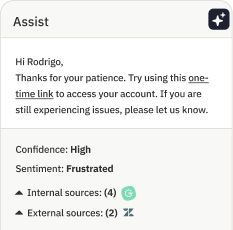
Personalization at scale becomes possible when AI analyzes customer data, sentiment, and history in real time. The technology recognizes emotional cues and context — whether someone's frustrated after multiple contacts or confused about a billing issue — and adjusts the response accordingly.
This works two ways: AI can craft and send tailored responses automatically, or it can serve as an agent copilot, surfacing relevant customer information and suggested replies that your team can refine.
3. Streamlining multi-channel support
Customers often use a variety of channels in a typical support experience. And, according to a recent Gartner survey, they want seamless transitions between those channels. Generative AI can automatically draft consistent and accurate responses to customer queries across your different support channels — a key capability as messaging volume explodes. For example, RCS business messages are projected to grow from 2.5 billion in 2024 to 86 billion by 2028, and GenAI helps ensure customers get a cohesive experience across all of them.
4. Boosting agent productivity
Agent productivity improves when AI handles the repetitive work that slows your team down. Here's how:
Full automation: AI resolves straightforward inquiries end-to-end, removing them from agent queues entirely
Workflow optimization: AI summarizes feedback, routes cases intelligently, and updates systems automatically
Response assistance: AI drafts replies or suggests next steps, cutting handle time without cutting corners
The time savings are meaningful. For example, using Assembled AI, Tithely was able to reduce average handle time by up to 26% and Honeylove increased solves per hour by 54% after just five months.
5. Proactively preventing SLA breaches
SLA breaches damage customer trust and create internal firefighting that could've been avoided. The problem isn't usually effort — it's visibility and prediction.
AI analyzes historical patterns and real-time signals to forecast volume spikes before they hit. It prioritizes urgent cases, suggests optimal staffing levels, and automates common questions so your team can focus on keeping complex issues on track. The result: you meet your service levels even during unexpected surges.
6. Simplifying workflow automation
Many generative AI tools can connect with the apps and tools your team is already using (like Salesforce or another CRM), which allows you to further streamline your workflows — like automatically categorizing support tickets or escalating issues based on priority. Your team benefits from smoother processes along with more time and energy to focus on complex or high-value interactions.
7. Improving accuracy with AI-driven forecasting
It’s tempting to think of generative AI only as a tool for creating customer-facing content, but it’s equally helpful for your internal resources. For example, it can analyze previous interactions and relevant customer metrics to predict future trends in support demand or identify common issues. With a more realistic grasp of peak times and problems, you can generate forecasts or make adjustments in real time for more effective staffing and resource planning.
8. Transforming self-service options
A whopping 81% of customers say they want more self-service support options, and generative AI can be a big help here, too. For example, AI tools or chatbots can:
Provide accurate responses to questions
Guide customers through troubleshooting or searches for information
Generate or update knowledge base articles with new information
This helps your customers find the information they need independently and also further improves the efficiency of your support team.
9. Ensuring brand consistency
AI tools are trained on the information you provide — including specific brand guidelines. This means it can generate replies that align with your company’s tone, voice, and messaging to deliver a more consistent experience across your different agents and support channels.
10. Reducing costs
With generative AI on your side, you don’t need human agents to address every query or handle every task. By reducing the amount of manual work, you reduce the need for extensive staffing which lowers your training costs, improves your resource allocation, and cuts down your operational expenses. For example, Thrasio saw cost savings of $1.8 million annually since adopting Assembled Assist.
11. Driving customer satisfaction
Better personalization, faster response times, and more self-service options — they all lead to a better experience for your customers. So, it’s little wonder why leaders see generative AI as one of the most promising advancements. 65% of customer service leaders expect using generative AI with conversational AI to increase customer satisfaction.
Key benefits of implementing generative AI in support operations
Generative AI delivers measurable improvements across every metric that matters: response times drop, resolution rates climb, costs decrease, and customer satisfaction improves. But the gains go deeper than numbers.
Here's what forward-thinking support teams are seeing when they implement AI strategically:
Lower operational costs. By resolving common issues without human intervention and helping agents work faster, generative AI directly reduces cost-per-contact. This allows you to scale support volume without scaling headcount at the same rate.
Increased agent productivity and satisfaction. When AI handles the repetitive, low-complexity work, human agents can focus on the issues that require their judgment and empathy. This makes their work more engaging and reduces the burnout that comes from answering the same questions all day.
Improved customer satisfaction (CSAT). Customers get what they want most: fast, accurate answers. Whether it’s an instant resolution from an AI agent or a quicker, more informed response from a human, the result is a better experience that builds loyalty.
Greater operational agility. Generative AI allows teams to adapt to unexpected volume spikes or business changes without scrambling to hire and train. It provides a layer of resilience that’s difficult to achieve with human staffing alone.
Challenges and considerations for AI implementation
For starters, implementing generative AI feels like another thing on your towering to-do list when you’re already spread thin. And, of course, there are questions about how it will impact your customer experience — particularly when 64% of customers say they’d prefer that companies don’t use artificial intelligence in customer service.
Adopting generative AI isn’t as simple as flipping a switch. While the potential is enormous, a successful implementation requires a clear-eyed view of the challenges. Getting this right means being pragmatic, not just optimistic.
Data privacy and security. Using AI to handle customer conversations means entrusting it with sensitive data. It’s critical to choose a solution with robust security protocols and a clear data handling policy that complies with regulations like GDPR and CCPA.
Risk of inaccuracies. AI models can sometimes “hallucinate” or provide incorrect information, leading to significant real-world consequences. For example, British Airways’ AI chatbot mistakenly canceled bookings and gave incorrect travel advice, creating customer frustration and damaging the brand's reputation. This risk must be managed through rigorous training on your specific knowledge base, clear escalation paths to human agents, and continuous monitoring.
Agent training and adoption. Your team needs to understand how to work alongside AI, rather than simply handing off tickets to it. This requires training on the tool’s capabilities, its limitations, and how to intervene when necessary. It’s a shift from being a problem-solver to an orchestrator.
Maintaining the human touch. Customers still value empathy, especially for complex or emotional issues. The goal of AI should be to enhance human connection rather than replace it. This means designing workflows that ensure a seamless and context-rich handoff to a human agent when the situation calls for it.
Six steps to implement generative AI in customer support operations
With so many applications in customer service, generative AI won’t remain a competitive advantage — it’ll quickly become table stakes. Here’s how you can jump on board and implement it for your support operations.
1. Assess your current processes and identify opportunities
The best AI implementations start with clarity about what problem you're actually solving. Successful teams don’t adopt AI everywhere at once — they target specific workflows where automation creates immediate, measurable impact.
Start by mapping your current workflows to identify two types of opportunities:
High-volume, repetitive work: FAQs, password resets, order status checks, knowledge base updates
Known pain points: The tasks your team consistently flags as time-consuming, error-prone, or frustrating
Those intersections — high volume plus high pain — are where AI delivers the fastest ROI.
2. Choose the right generative AI solution
Once you've identified where AI fits, evaluate platforms against criteria that matter for enterprise support operations:
Integration: Does it connect seamlessly with your CRM, help desk, and communication platforms — or will it create another data silo?
Ease of use: Can your team train and update the AI without engineering support, or does every change require a ticket?
Customization: Can you adapt the AI to your brand voice, policies, and edge cases — or are you locked into generic responses?
Scalability: Will it handle your volume during peak seasons, and can it grow as your team expands?
3. Prioritize data privacy and security
AI relies heavily on customer data to generate accurate responses, so data privacy and security are top priorities. Data needs to be protected and comply with relevant regulations (like GDPR or CCPA). And, if you’re in a heavily regulated industry, there might be even more requirements you need to meet.
Ask thoughtful questions to understand a solution’s data handling practices, such as whether it offers encryption and access controls. This information will help you be more proactive in managing privacy concerns.
4. Train AI models with relevant data
Your AI is only as accurate as the data you feed it. While automation promises hands-off operations, you'll need upfront investment to build that foundation.
Train your AI with diverse, high-quality data from previous customer interactions, support tickets, knowledge bases, and brand guidelines. The more comprehensive your training data, the better the AI performs — especially on edge cases and nuanced questions, and delivering the perceived human touch that customers still desire.
This isn't a one-time exercise. Commit to continuous updates as your products, policies, and customer needs evolve. The teams seeing 60-70% resolution rates are the ones treating AI training as an ongoing discipline instead of a one-time launch task.
5. Train your team on AI adoption
Your AI solution isn’t the only thing that needs training — your support team does too. Rolling out a new tool without any guidance or resources will make them feel overwhelmed and potentially even resentful.
Thorough training helps them use and update your AI tool with confidence. Plus, keeping your human agents involved is also one of the best ways to combat inaccuracies or other slip-ups that can creep in with AI. Host frequent and helpful training sessions about topics like:
Updating and maintaining AI training data and optimizing knowledge bases
Identifying and reporting AI inaccuracies or biases
Escalating complex issues AI can’t resolve
Monitoring AI performance and providing feedback
Understanding the AI tool’s capabilities and limitations
Communicating effectively with customers about AI-driven responses
6. Monitor, measure, and optimize
AI implementation doesn't end at launch — it evolves with your operation. Set up regular monitoring cadences to track performance and identify improvement opportunities:
Weekly: Review resolution accuracy, CSAT scores, and escalation patterns to catch problems early
Monthly: Analyze trends in automation rates, handle time reduction, and cost per contact
Quarterly: Update knowledge bases with new products and policies, retrain models on recent interactions, and adjust workflows based on agent feedback
The teams seeing continuous improvement treat AI optimization the way they treat agent coaching: as an ongoing discipline that compounds over time.
Enhance your customer service with Assembled Assist’s generative AI
It feels like a gross understatement to say that generative AI is transforming customer service. It’s completely changed the game in terms of helping teams deliver more efficient and effective support — and it won’t slow down anytime soon.
Ready to get started on your generative AI journey? With Assembled AI, your team can automate resolutions for common inquiries, benefit from auto-drafted replies in your brand voice, and design tailored workflows for any scenario. That means more solves per hour, fewer escalations, and an increase in positive CSAT replies.
Put simply, customer expectations are evolving — and your tech stack needs to evolve too. Schedule a demo today to discover how Assembled AI can help you redefine top-notch customer service for the modern age.
Frequently asked questions about generative AI in customer service
What's the typical timeline for implementing generative AI in customer service?
For out-of-the-box solutions, expect two to four weeks from contract to launch — most of that is training the AI on your knowledge base and brand guidelines. Custom implementations with complex integrations typically take two to three months. The fastest path: start with one high-volume use case, prove ROI, then expand.
How much does generative AI for customer service typically cost?
Pricing varies by vendor and volume, but most platforms charge per interaction or per agent seat. For a 50-agent team handling 10,000 monthly conversations, expect $2,000-$8,000/month depending on features and resolution complexity. Calculate ROI by comparing AI costs against the fully loaded cost of agents handling those same interactions — teams typically see 30-40% cost reduction within six months.
Will generative AI replace my human customer service agents?
No — but it will change what they spend time on. AI handles high-volume, straightforward work (password resets, order tracking, basic troubleshooting), while humans focus on complex issues, escalations, and situations requiring empathy or judgment. Most teams redeploy capacity rather than reduce headcount, using efficiency gains to improve service levels, expand coverage hours, or tackle backlogged channels.
How do I ensure data security when using AI for customer interactions?
Start by verifying your AI vendor's compliance certifications (SOC 2, GDPR, HIPAA if applicable) and data handling practices. Implement role-based access controls, encrypt data in transit and at rest, and establish clear policies for what customer data the AI can access. Most enterprise platforms allow you to restrict PII, mask sensitive information, and maintain audit logs of every AI interaction. If you're in a regulated industry, work with your legal and security teams to validate the vendor's architecture before deployment.
How do I measure the ROI of generative AI in customer service?
Track both efficiency and experience metrics. On efficiency: measure resolution rate (target 60-70% for mature implementations), average handle time reduction (typically 15-25%), and cost per contact. On experience: monitor CSAT for AI-handled interactions, escalation rates, and customer effort scores. Calculate ROI by comparing AI costs against the fully loaded cost of handling those interactions manually. Most teams see positive ROI within three to six months, with returns improving as resolution rates climb.