When a conversation in Assembled’s AI Chat Agent reaches the point of handoff, it can take one of two paths: live chat with a person or email for follow-up. The right path depends not only on what the customer needs, but also on whether the right team is open for live support.
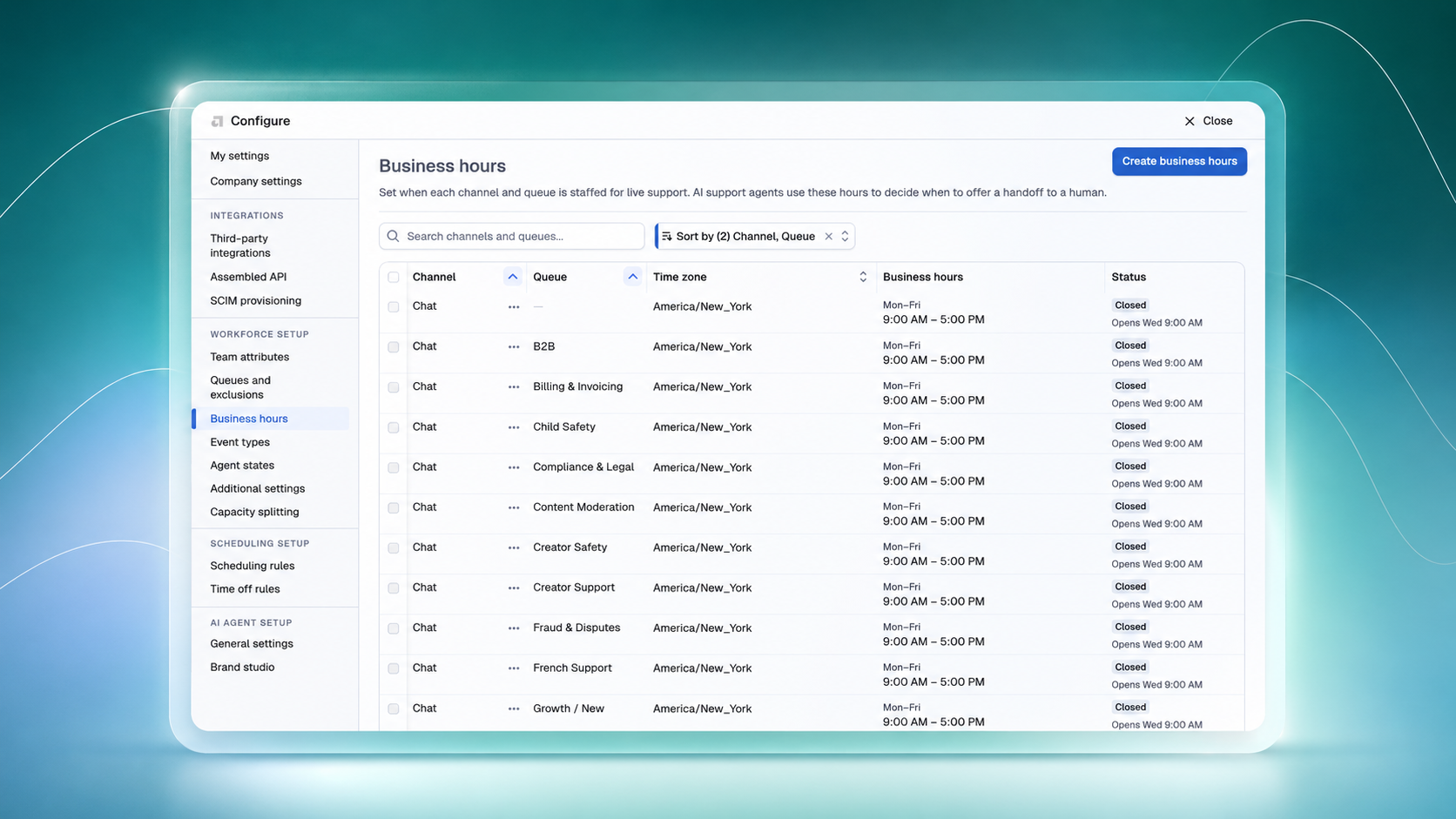
Until now, one business-hours schedule governed every queue within a chat profile. But support teams don’t operate on one schedule — and a live chat offer should reflect the hours the right team actually covers.
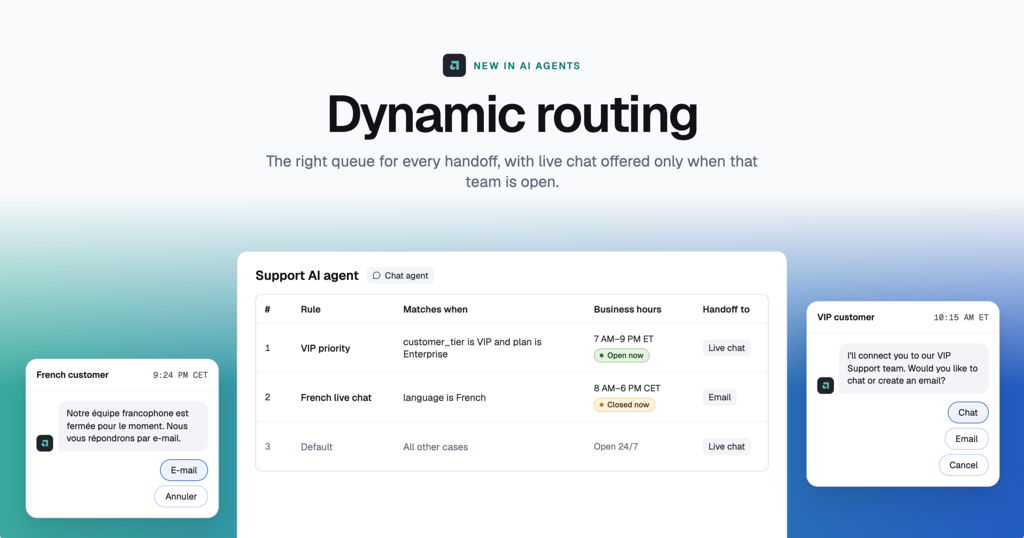
Today, we’re introducing Dynamic Routing, part of Assembled’s Dynamic Handoffs capability. Dynamic Routing uses ordered rules to select the right destination, then applies the queue-level business hours already configured in Assembled Workforce Management to determine whether the customer sees live chat or email.

Support teams don’t run on one schedule
Your VIP queue might stay open later than your general queue. French-language support may have different hours than Japanese support. Some topics, like chargebacks, may need to go directly to email every time.
A single schedule forces admins into a bad tradeoff. Set broad hours and risk offering live chat after a team has closed. Set narrow hours and send customers to email even when the right queue is open.
Either way, the customer experience is governed by a blanket schedule instead of how the operation actually works.
Route handoffs based on how your team actually operates
Dynamic Routing gives CX Ops and WFM admins ordered rules that govern where a chat handoff goes once it’s triggered. Rules can match on customer segment, language, or topic, then direct the conversation to a particular queue — or straight to email.
When a rule selects a queue, that queue’s configured WFM business hours determine the handoff method:
- If the queue is within business hours, the customer can be offered live chat.
- If the queue is closed, the conversation falls back to email.
- If the rule specifies email, business hours don’t factor in.
There’s no second schedule to maintain and no need to manually keep chat profiles aligned with changing queue hours. Your AI and workforce operations use the same source of truth.
Safer by design, easier to explain
Dynamic Routing evaluates the handoff twice: once before the live chat option appears and again when the customer submits it. If the selected queue closes between those moments, Assembled can remove live chat and fall back to email.
Routing rules only constrain the handoff toward email; they never upgrade an email path to live chat. That safety-first design helps teams avoid offering chat outside the selected queue’s configured hours.
Every routed conversation also records the rule, queue, and schedule decision that fired. When someone asks, “Why did this go to email?”, your team has a clear answer.
What Dynamic Routing looks like in practice
Teams can now:
- Route VIP customers to a dedicated queue during its extended weekday hours, then fall back to email outside them.
- Send sensitive topics, such as chargebacks, directly to email.
- Give French and Japanese chats separate queues and schedules within the same chat profile.
- Explain when live support is closed, capture what the customer needs, and route the conversation to email for follow-up.
One setup, a more honest customer experience
Admins manage queue business hours once in Assembled instead of recreating schedules across chat profiles and hoping they stay in sync.
Customers get an option your team can stand behind: live chat when the right team is open, or a clear path to asynchronous support when it isn’t.
That’s the bridge between AI automation and real-world operations: connecting the options your AI presents to the teams and operating hours behind them.
Get started with Dynamic Routing
Dynamic Routing is available now for chat agents, with voice and other live-handoff agent types planned next. Contact your Customer Success Manager or support@assembled.com to enable it.
Not an Assembled customer yet? Request a demo to see how Assembled connects AI agents and workforce management.