Automation is scaling — but the work left for human agents is getting harder, not easier.
As AI takes over routine tickets, agents are increasingly responsible for what’s genuinely complex: investigating issues across multiple systems, handling policy exceptions, and navigating emotionally charged or high-trust situations. The easy work is gone. What remains demands more judgment, more context, and more cognitive effort than ever before.
Most AI copilots weren’t built for this reality. They emerged when agents still handled a mix of simple and complex work — answering FAQs, following scripts, and resolving repeatable issues. That era is over. Today’s agents don’t need help finding basic answers. They need tools that reduce the cognitive load of the work AI can’t automate — tools that consolidate context, eliminate busywork, and help agents act quickly without bouncing between systems.
This guide is for support and operations leaders evaluating AI copilots in 2026 — whether you’re choosing one for the first time or re-evaluating an early deployment that hasn’t delivered. It focuses on what actually helps agents in production: real-time assistance during live interactions, the ability to take action (not just make suggestions), meaningful reduction in cognitive load, and efficiency after the conversation ends.
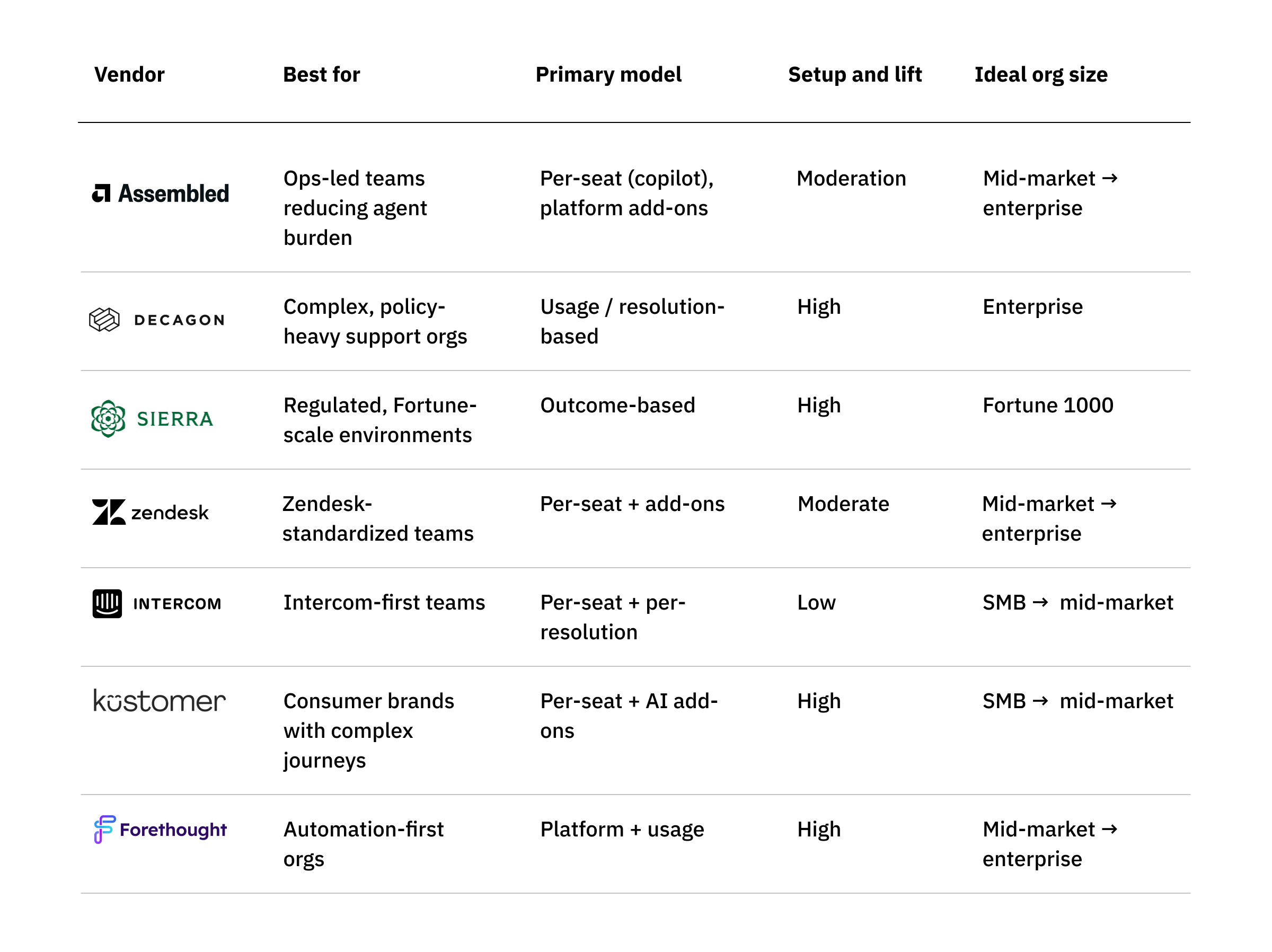
The 7 best AI copilots for customer support
“Agent assist” and “copilot” are often used interchangeably. In practice, what matters isn’t the label — it’s whether the tool helps agents in the moment or only after the fact, and whether it can actually do the work or just suggest what to do.
Many tools marketed as copilots fall short. Some focus on post-conversation summaries or manager dashboards that don’t help agents under pressure. Others surface suggestions but leave agents to swivel-chair between systems to complete the task. And many add UI clutter instead of reducing cognitive load.
The vendors below were evaluated based on how well they support modern agent work — the high-judgment, high-context work that remains once automation removes routine tickets. We prioritized copilots that assist agents in real time, can execute workflows and take action, reduce context-switching and busywork, support efficient wrap-up after conversations, and scale alongside hybrid human + AI support models.
Assembled
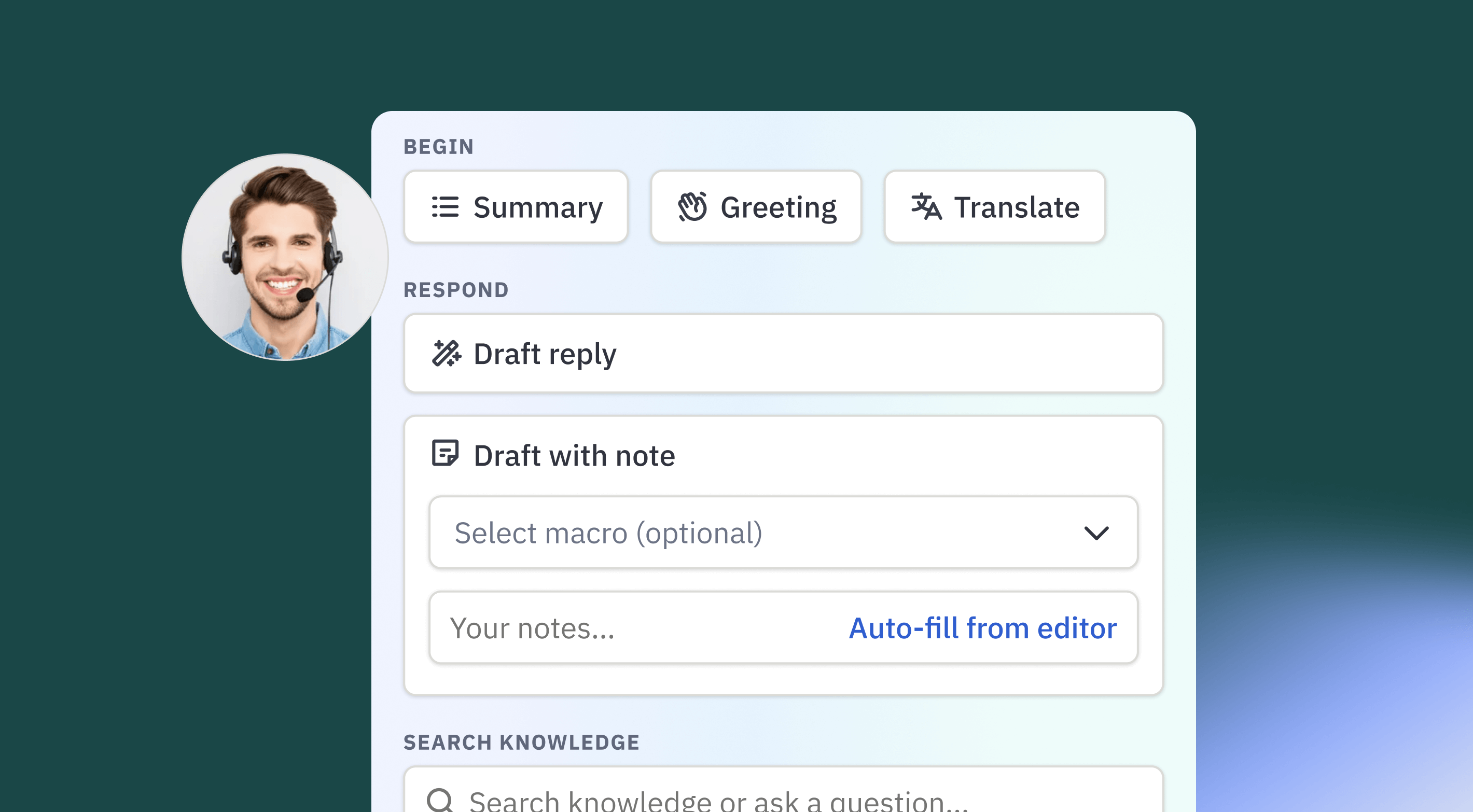
Assembled’s AI Copilot is part of a broader support operations platform, rather than a standalone agent-assist tool. The copilot is designed to support agents across the full lifecycle of a support interaction — helping during live conversations and reducing follow-up effort afterward — while sharing context and workflows with Assembled’s AI Agents and workforce management (WFM) capabilities. This reflects an operations-first approach that treats agent assistance, automation, and staffing as interdependent.
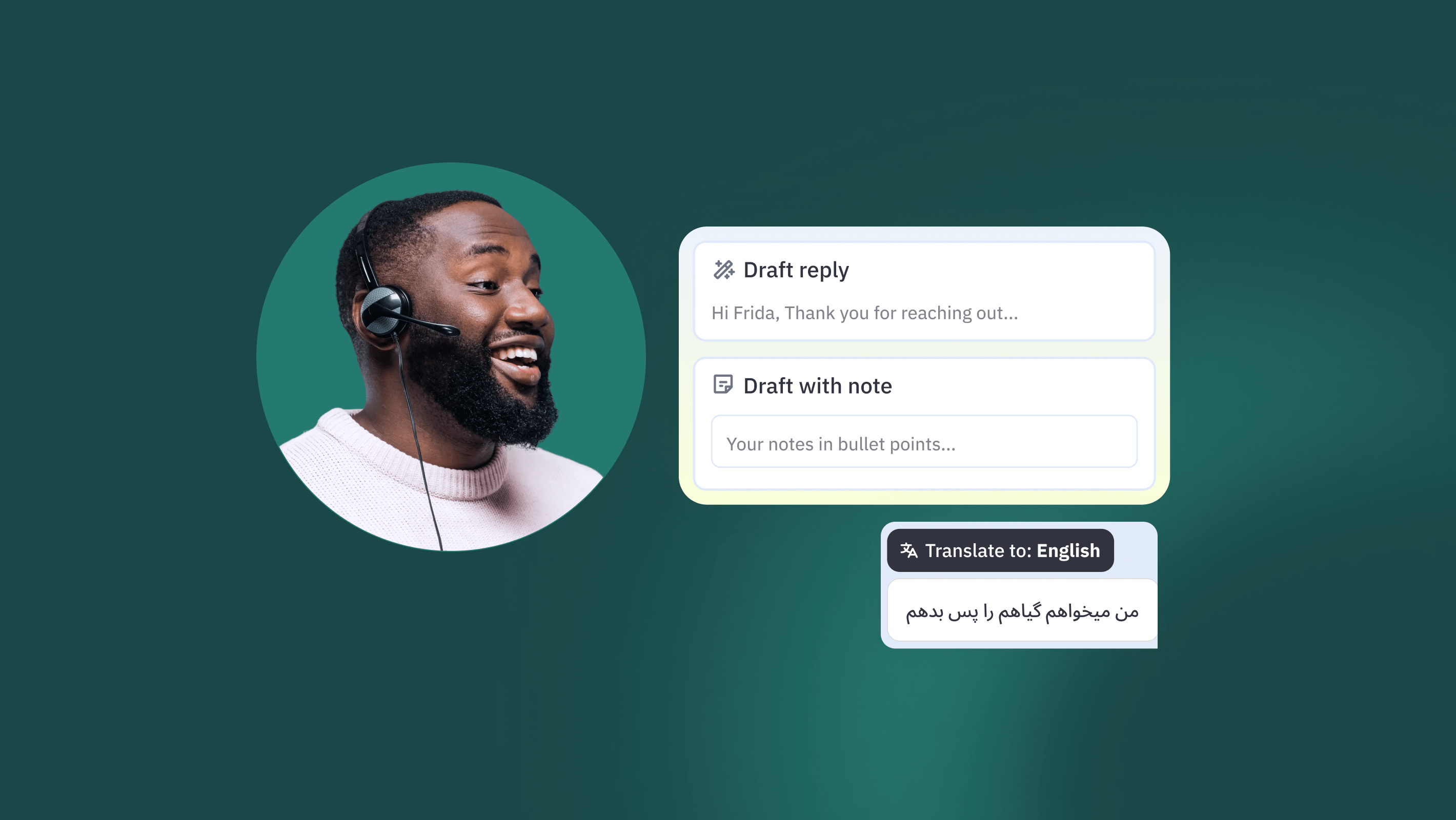
In practice, the copilot lives directly inside existing help desks and contact center tools. During interactions, it surfaces relevant knowledge and drafts responses aligned to brand tone and customer context. After interactions, it can generate summaries, wrap-up notes, and suggested next steps to reduce manual documentation and improve continuity across agents and shifts. User feedback consistently highlights reduced administrative effort and smoother handoffs, alongside improvements in response quality. The trade-off is scope: Assembled’s copilot tends to deliver the most value in organizations with established workflows and knowledge, and may feel heavier than necessary for small or low-volume teams seeking a narrow drafting tool.
Key features:
- Agent-facing AI copilot embedded in existing help desks
- Drafted replies with tone and sentiment awareness
- Automatic summaries and wrap-up notes to support handoffs
- Knowledge surfacing from policies, procedures, and case history
- Real-time translation for multilingual support
- Shared context with AI Agents and AI-powered workforce management
- Enterprise-grade security and compliance
Pricing: Assembled AI Copilot starts at approximately $35 per user/month and is sold via sales-assisted plans. AI Agents and WFM are priced separately. Total cost depends on how broadly teams adopt the wider Assembled platform.
Pros:
- Reduces both in-conversation and post-interaction administrative work
- AI outputs generally align well with brand tone and customer context
- Embeds cleanly into existing CX tools with minimal agent disruption
- Benefits from shared context across AI, workflows, and staffing
- Strong early customer feedback on usability and support
Cons:
- Requires upfront effort to configure knowledge and workflows
- Broader platform depth may exceed the needs of simpler teams
- Best value realized when used alongside other Assembled capabilities
- Smaller public review footprint than long-established CX vendors
- Not intended as a general-purpose AI copilot outside support operations
Best for: Mid-market and enterprise support organizations that want an operations-aware AI copilot integrated with workflows, staffing, and AI automation. Assembled is a good fit for teams looking to reduce agent effort across both live interactions and follow-up work, and less suited to buyers seeking a lightweight, drafting-only copilot with minimal setup.
Decagon
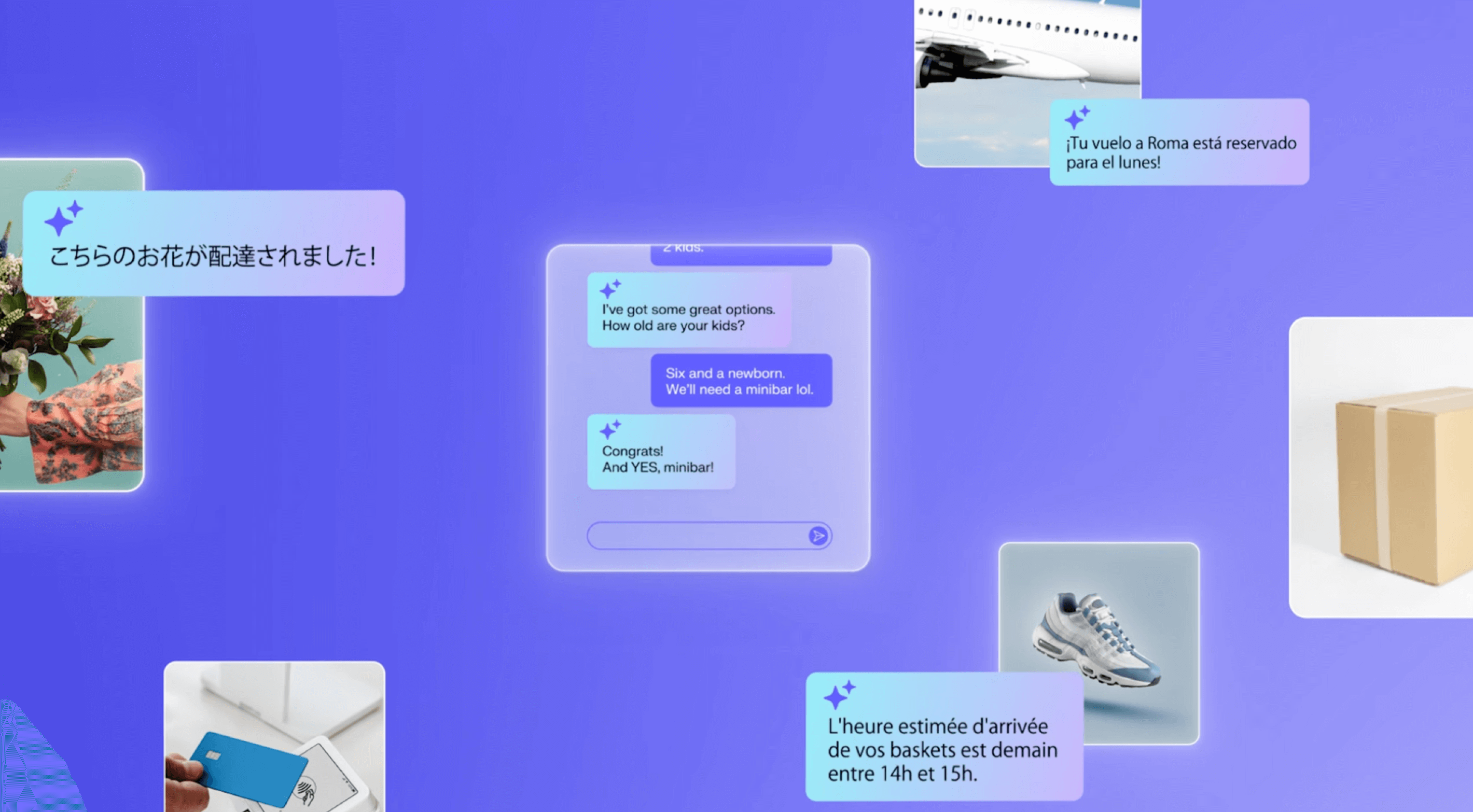
Decagon’s AI copilot, Agent Assist, is designed for enterprise support teams that want AI deeply embedded into agent workflows — not just drafting replies, but participating in real operational decisions. Unlike lightweight copilots that operate as standalone assistants, Decagon’s copilot is built on the same AI Agent Engine that powers its autonomous agents, routing logic, and QA tooling. The result is a copilot that shares context, procedures, and guardrails with automation by default.
In practice, this means Agent Assist behaves less like a writing aid and more like an operational layer inside the helpdesk. It delivers real-time summaries, suggested responses, translation, and knowledge retrieval directly within tools like Zendesk and Salesforce, with explicit source attribution back to the knowledge base. Teams consistently report fast time to value and strong “out of the box” performance, particularly in complex, policy-heavy environments. The trade-off is complexity: deeper workflows and configuration often benefit from engineering involvement and Decagon’s high-touch deployment model, making the copilot best suited for mature, well-resourced organizations.
Key features:
- Agent-facing AI copilot embedded directly in existing helpdesks
- Real-time conversation summaries, suggested replies, and multilingual translation
- Knowledge retrieval with explicit source attribution for verification
- Agent Operating Procedures (AOPs) enabling workflow-aware assistance beyond text drafting
- Shared logic with autonomous agents, routing, and QA tooling
- Integrated testing, simulations, and QA (Watchtower)
- Enterprise-grade security and zero-retention LLM policies
Pricing: Sales-led, enterprise pricing with usage- or resolution-based models. Public rates are not disclosed. Customers report strong ROI at scale, but pricing is widely perceived as premium and less accessible for smaller teams.
Pros:
- Strong out-of-the-box performance and fast implementation timelines
- Copilot supports complex, policy-driven workflows — not just response drafting
- Source-linked suggestions help preserve agent trust and reduce hallucination risk
- Best-in-class translation capabilities cited by global support teams
- High-touch implementation and support consistently praised
Cons:
- Advanced configuration can feel engineering-heavy despite “no-code” positioning
- Some users report limited transparency into AI decisioning in edge cases
- Premium pricing limits suitability for SMB or lower-volume environments
- Depth and flexibility introduce operational complexity
- Less suited for teams seeking a lightweight, standalone copilot
Best for: Large, complex support organizations that want a deeply integrated, workflow-aware AI copilot and are comfortable adopting it as part of a broader AI agent platform. Best suited for enterprises with high volumes, technical support resources, and a desire to move beyond surface-level agent assistance toward tighter AI–operations integration.
Sierra
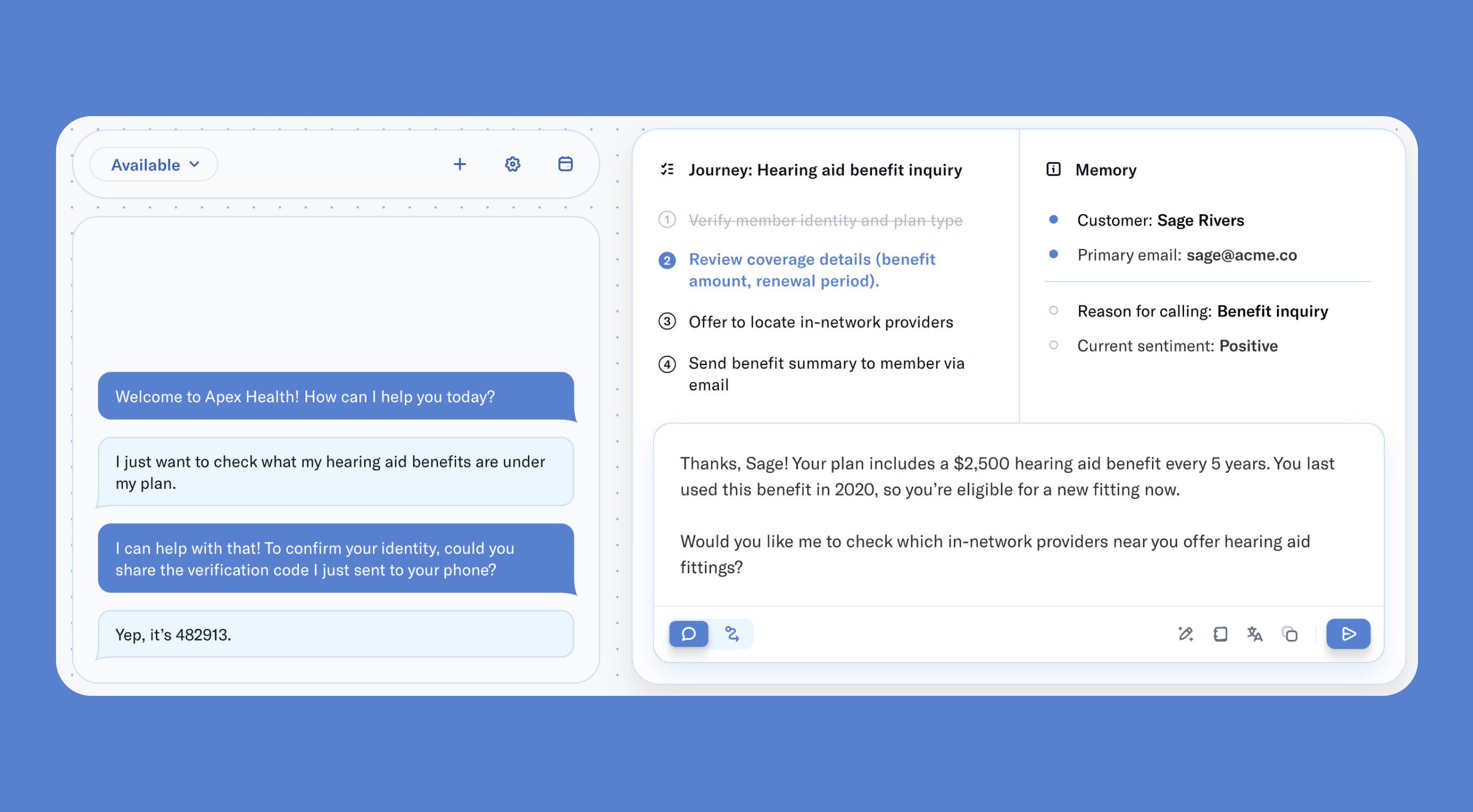
Sierra’s AI copilot, branded as Live Assist, is built on top of the company’s broader AI agent platform rather than offered as a standalone productivity tool. Sierra positions itself as an “agent OS” for large enterprises, where the same underlying AI agent can operate autonomously with customers or assist human agents in real time. Live Assist is the agent-assist surface of that system, designed to guide reps during live conversations while sharing the same goals, guardrails, and integrations as Sierra’s fully autonomous agents.
In practice, Live Assist provides real-time guidance, grounded response drafts, and one-click actions inside the agent workspace. Because it runs on the same foundation as Sierra’s autonomous agents, it can surface not just suggested replies but also execute complex workflows — such as refunds, account changes, or troubleshooting steps — without agents leaving the conversation. Customers and reviewers consistently praise response accuracy, safety, and performance at scale. The trade-offs are cost and complexity: Sierra is clearly optimized for Fortune-scale, regulated environments, and deeper integrations or legacy system connections often require significant technical coordination and carry a high total cost of ownership.
Key features:
- Agent-facing AI copilot embedded into live chat and voice workflows
- Real-time guidance and grounded response drafts using shared knowledge and SOPs
- One-click execution of operational workflows (refunds, updates, changes)
- Shared foundation with fully autonomous AI agents across channels
- Strong voice and telephony support, including IVR use cases
- Enterprise-grade supervision, guardrails, and compliance
- Outcome-based pricing tied to resolved conversations or business impact
Pricing: Sierra uses custom, enterprise contracts with outcome-based pricing (e.g., paying when the AI resolves an issue or drives a defined result). No public rate card or self-serve tiers. Reviewers consistently describe Sierra as a premium, high-cost platform best justified by scale and impact rather than affordability.
Pros:
- High accuracy and “safe” AI behavior validated by user feedback
- Deep actionability beyond text suggestions, including multi-step workflows
- Strong performance and reliability at very high volumes
- Unified agent foundation across autonomous and assisted use cases
- Robust security and compliance posture for regulated industries
Cons:
- High total cost of ownership limits accessibility for mid-market teams
- Advanced or legacy integrations can be complex and resource-intensive
- Small public review base relative to platform scale
- Inconsistent experiences reported for deep technical support escalations
- Overpowered for teams seeking a lightweight or low-lift copilot
Best for: Large enterprises — especially in financial services, healthcare, telecom, and other regulated industries — that want a deeply integrated AI copilot tied to autonomous agents and real operational outcomes. Sierra is best suited for organizations with complex workflows, high interaction volumes, and the resources to support enterprise-grade implementation. It is less ideal for cost-sensitive teams or buyers looking for a simple, plug-and-play agent assist tool.
Zendesk
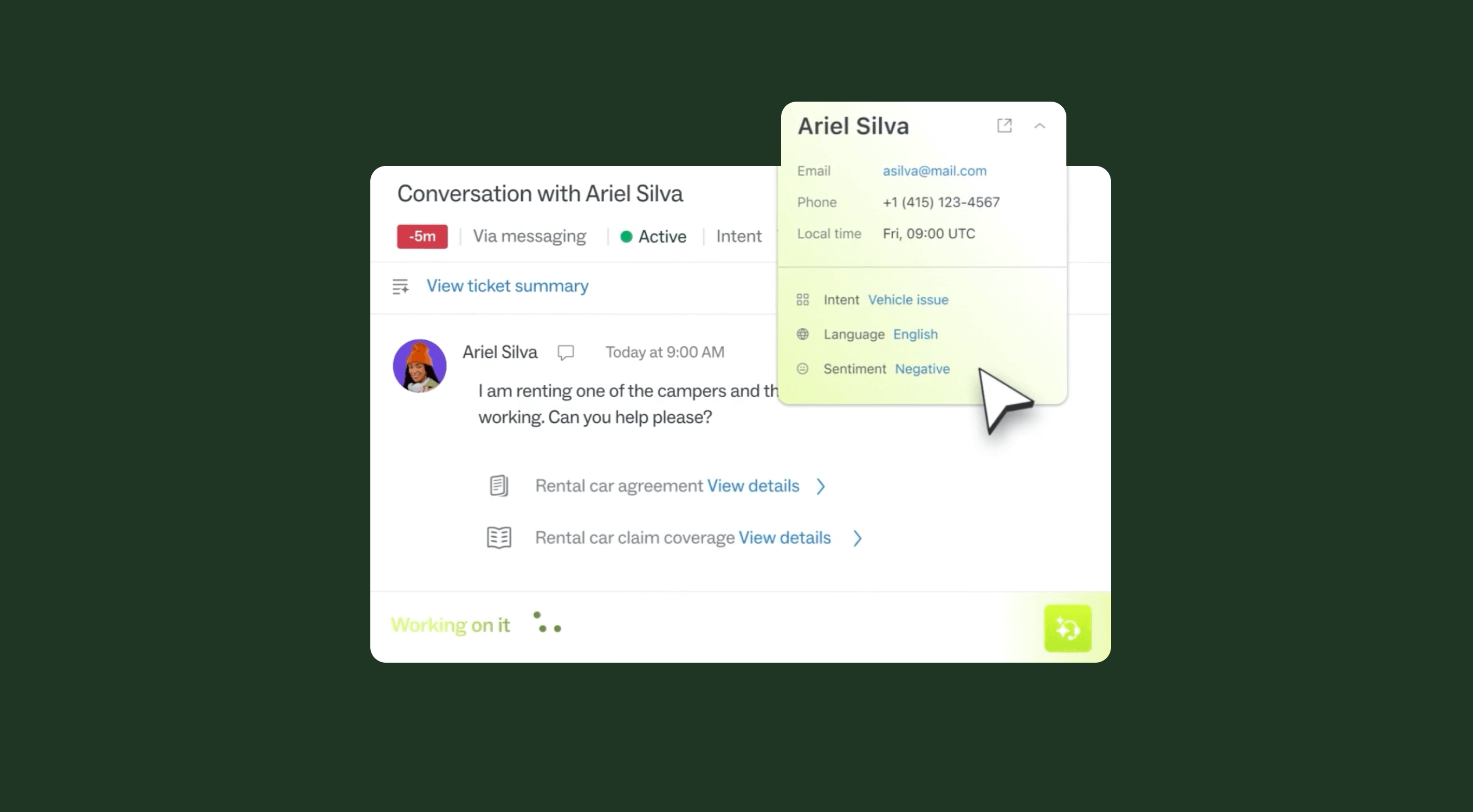
Zendesk’s AI Copilot is positioned as a core component of its broader AI-first Resolution Platform, rather than a standalone assistant. Designed specifically for customer and employee service teams, Copilot is embedded directly into the Zendesk workspace to help agents move from intake to resolution more quickly through in-context guidance, suggested replies, and workflow automation.
In practice, Copilot functions as an always-on assistant inside Zendesk’s ticketing and messaging interface. It analyzes intent, sentiment, and historical context to surface next-best actions, draft responses, and guide agents through predefined business procedures. Teams consistently report productivity gains from automation, intelligent routing, and reduced manual work. At the same time, feedback highlights meaningful trade-offs: realizing the full value of Copilot often requires substantial configuration, strong admin ownership, and careful management of add-ons and pricing as organizations scale their use of AI across the Zendesk platform.
Key features:
- Agent-facing AI copilot embedded natively in the Zendesk workspace
- Real-time reply suggestions and next-best actions informed by ticket context
- Intent, sentiment, and language detection for faster triage and prioritization
- Guided workflows based on natural-language business procedures
- Ability to trigger actions across Zendesk and connected third-party systems
- Tight integration with Zendesk AI Agents, QA, WFM, and analytics
- Enterprise-grade security, privacy, and compliance
Pricing: Copilot is available as a $50 per-agent/month add-on (billed annually) or bundled with Zendesk Suite plans ($155–$209 per agent/month, annual). Additional AI, QA, WFM, and data-privacy capabilities are sold as separate add-ons. Pricing is transparent at the SKU level, but total cost can escalate quickly as teams adopt more advanced AI and workforce features.
Pros:
- Deeply embedded into a mature, widely adopted CX platform
- Strong multichannel support and unified agent workspace
- Proven automation and AI capabilities for routine and mid-complexity cases
- Large ecosystem of integrations and marketplace apps
- Backed by extensive analyst validation and enterprise adoption
Cons:
- Advanced configuration and workflow setup can be complex
- Admin experience and learning curve increase with scale and customization
- Pricing can feel fragmented as add-ons accumulate
- Perceived as expensive for SMB or cost-sensitive teams
- Mixed feedback on Zendesk’s own support and billing practices
Best for: Organizations already standardized on Zendesk that want a CX-specific AI copilot tightly integrated into their existing service stack. Zendesk Copilot is best suited for mid-market and enterprise teams seeking productivity gains through automation and guided workflows, and that have the admin capacity to manage configuration and cost trade-offs. Less ideal for buyers looking for a lightweight, low-cost copilot or minimal operational overhead.
Intercom
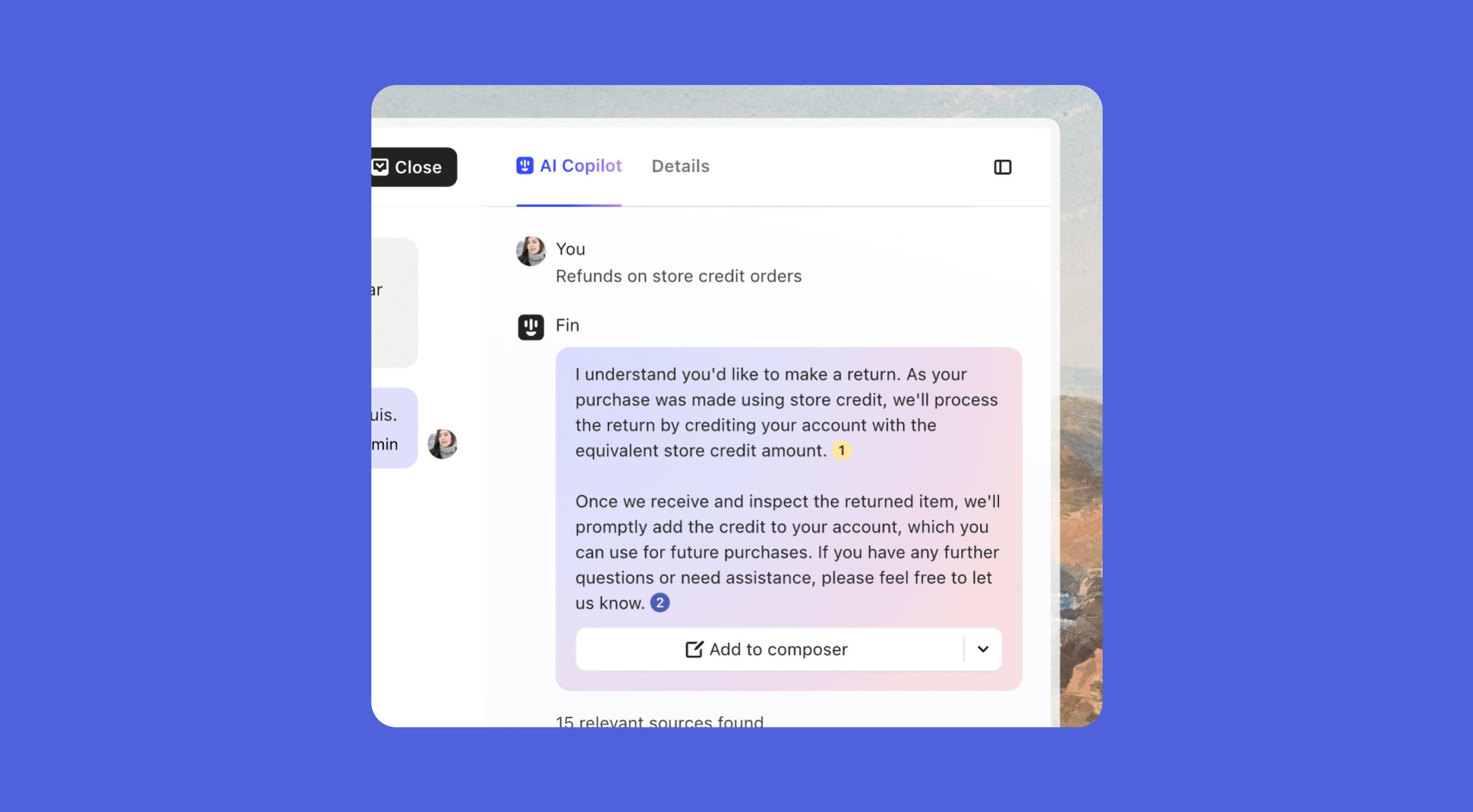
Intercom’s AI copilot is part of a tightly integrated, AI-first customer service platform that combines a helpdesk, customer-facing AI agent (Fin), and agent-assist tooling in a single system. Rather than positioning Copilot as a standalone productivity layer, Intercom treats it as the human counterpart to Fin: Fin resolves a large share of customer inquiries autonomously, while Copilot helps agents handle the remainder faster and more consistently inside the Intercom Inbox.
In practice, Copilot functions as an in-workflow assistant for agents. It provides ticket summaries, suggested replies, and on-demand answers drawn from help center content, internal documentation, macros, and historical conversation data — all surfaced directly in the Inbox with source links for verification. Teams generally report fast time to value and minimal setup, particularly when they already use Intercom’s helpdesk and knowledge base. The trade-off is scope: Copilot’s strengths are tightly coupled to Intercom’s ecosystem, and its value diminishes for organizations running complex, multi-platform support stacks or looking for deeper workflow orchestration beyond knowledge retrieval and drafting assistance.
Key features:
- Agent-facing AI copilot embedded natively in the Intercom Inbox
- Real-time ticket summaries and AI-generated reply suggestions
- Knowledge retrieval from help center, internal docs, external URLs, PDFs, and past conversations
- Explicit source links to support agent verification and trust
- Tight integration with Fin AI Agent in a shared, self-improving AI system
- Multilingual support and auto-translation
- Dedicated Copilot usage and performance reporting
- Enterprise-grade security and AI governance (SOC 2, ISO 27001, ISO 42001, HIPAA, AIUC-1)
Pricing: Copilot is priced as a per-agent add-on (approximately $29–$35 per seat/month), layered on top of Intercom’s helpdesk seat pricing. Fin AI Agent is priced separately at $0.99 per AI resolution. Pricing is transparent, but total cost can escalate at scale due to the combination of seat-based and per-resolution charges.
Pros:
- Seamless, low-friction agent experience inside Intercom’s Inbox
- Fast setup with strong out-of-the-box performance for common queries
- Deep use of historical conversation data improves relevance and personalization
- Clear source attribution helps maintain agent trust
- Mature ecosystem, strong market adoption, and extensive third-party validation
Cons:
- Copilot is tightly coupled to Intercom; limited flexibility for non-Intercom stacks
- Best suited to Tier 0–1 assistance; complex or nuanced cases still require human judgment
- Per-resolution pricing for Fin can be expensive and hard to forecast at high volumes
- Limited workflow orchestration compared to more platform-oriented copilots
- Less differentiated for teams already using another primary helpdesk
Best for: Mid-market and enterprise teams already standardized on Intercom that want a fast, low-lift AI copilot tightly integrated with customer-facing automation. Intercom Copilot is best suited for organizations prioritizing ease of deployment, strong knowledge retrieval, and incremental agent productivity gains within a single platform — and less ideal for teams with complex, multi-tool environments or a need for deeper, workflow-driven agent assistance.
Kustomer
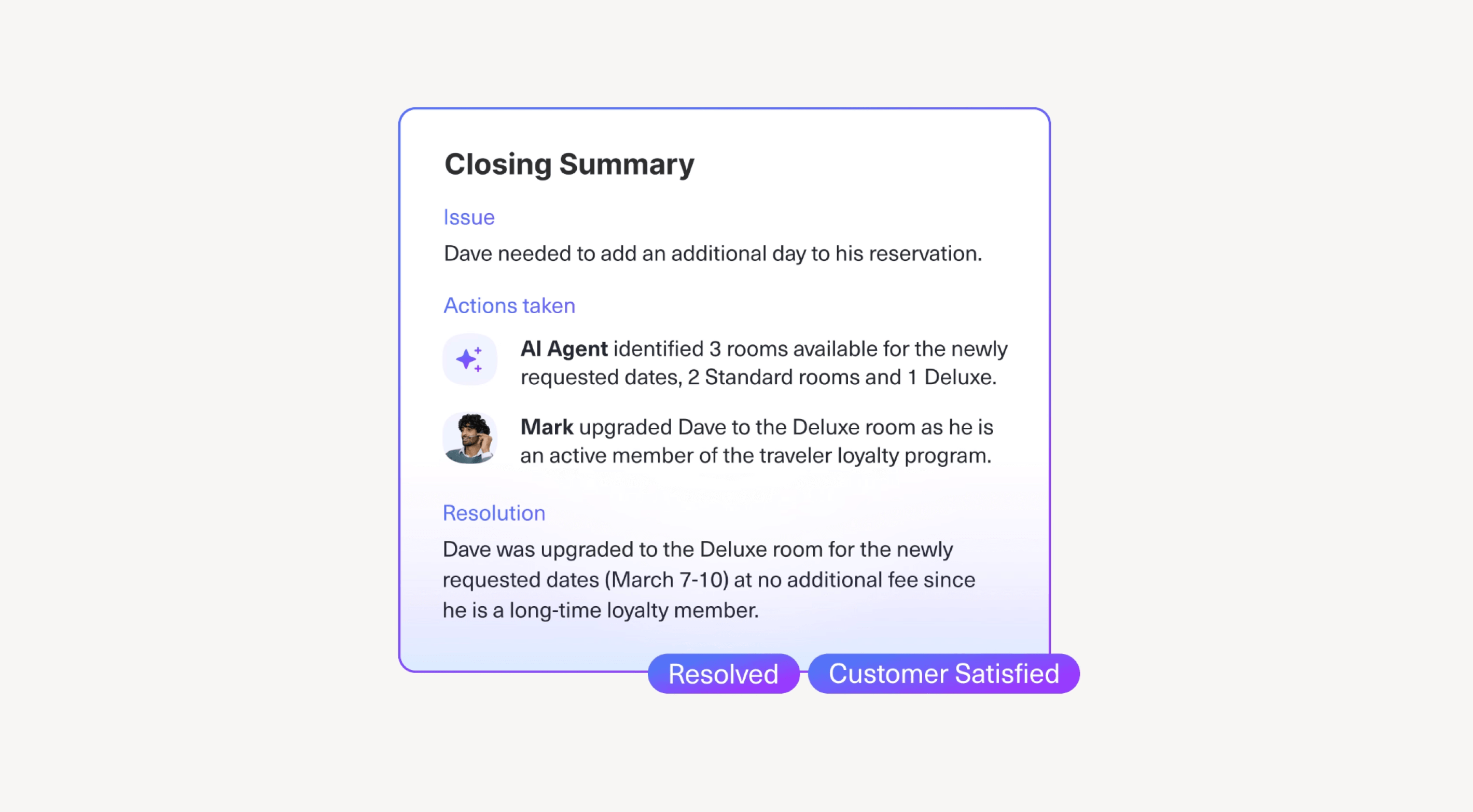
Kustomer’s AI copilot, branded as AI for Reps, is part of a broader AI-native customer experience platform built around a unified customer “Timeline.” Rather than layering AI on top of a traditional ticketing system, Kustomer embeds agent assistance directly into its CRM, workflows, and omnichannel messaging stack. This approach emphasizes context: AI suggestions, summaries, and actions are informed by a complete view of the customer across channels, orders, and prior interactions.
In practice, AI for Reps focuses on reducing agent effort through real-time suggestions, automated summaries, and workflow-driven actions such as tagging, routing, and record updates. Reviewers consistently highlight the Timeline as a meaningful productivity boost, especially for consumer brands handling high-volume, omnichannel interactions. The trade-off is complexity. While many features are no-code, organizations with sophisticated workflows often report a steep learning curve, non-trivial setup effort, and limitations in reporting flexibility that require careful planning and ongoing administration.
Key features:
- Agent-facing AI copilot embedded natively in the Kustomer workspace
- Real-time reply suggestions and next-best actions informed by unified customer data
- Automatic handoff and close summaries to preserve context across agents and tiers
- AI-driven tagging, routing, and workflow automation
- Two-way translation and writing assistance within the agent console
- AI-native analytics (Data Explorer) for CX leaders
- No-code AI Agent Studio for configuring specialized agents
- Enterprise-grade security and compliance (SOC 2, ISO 27001, HIPAA-enabled)
Pricing: Kustomer uses seat-based pricing for the core platform ($89–$139 per agent/month, annual, 8-seat minimum) with AI add-ons layered on top. AI for Reps is priced from ~$40 per user/month, with additional usage-based fees for customer-facing AI and other advanced capabilities. Pricing is relatively transparent at the base level, but total cost can escalate as modules, channels, and AI features are added.
Pros:
- Unified customer Timeline delivers strong context and personalization for agents
- AI embedded directly into CRM, workflows, and omnichannel messaging
- Effective automation and routing reduce manual effort and handle times
- Strong technical support and enterprise-grade security posture
- Well suited for digital-first consumer brands with complex customer journeys
Cons:
- Initial setup and ongoing administration can be complex for advanced use cases
- Reporting and analytics are perceived as less flexible than advertised
- Learning curve for admins and agents in highly customized environments
- Pricing complexity increases as AI modules and channels are layered on
- May feel overpowered or expensive for smaller or simpler support teams
Best for: Mid-market organizations — particularly eCommerce, retail, travel, and fintech brands — that want an AI copilot tightly integrated into a unified CX platform. Kustomer is best suited for teams that value rich customer context and operational automation across channels, and that are prepared to invest in setup, training, and governance. Less ideal for buyers seeking a lightweight, plug-and-play copilot or highly flexible, self-service analytics out of the box.
Forethought

Forethought’s AI copilot, Assist, is part of a broader, enterprise-focused AI agent platform built specifically for customer support. Rather than operating as a standalone sidebar copilot, Assist is one component in a coordinated, multi-agent system that spans autonomous resolution (Solve), routing (Triage), insights (Discover), and QA. This architecture positions Forethought as a CX automation platform first, with the copilot acting as an in-workflow guide for human agents.
In practice, Assist focuses on helping agents move through tickets faster and more consistently. It provides real-time ticket summaries, guided resolution steps via Autoflows, and AI-drafted responses directly inside existing helpdesks through a Chrome extension. Teams report meaningful gains in efficiency, particularly from automated tagging, routing, and intent understanding. The trade-off is operational overhead: achieving high accuracy and consistent outcomes typically requires significant setup, tuning, and ongoing governance. External feedback also highlights CX risk when autonomous flows are poorly configured, with end users reporting loops or difficulty reaching human agents in some deployments — a gap that support leaders need to actively manage.
Key features:
- Agent-facing AI copilot embedded in helpdesks via Chrome extension
- Real-time ticket summarization and AI-generated reply suggestions
- Guided, step-by-step resolution using Autoflows and knowledge content
- Shared workflows across chat, email, voice, Slack, and other channels
- Multi-agent platform spanning Assist, Solve, Triage, Discover, and Agent QA
- Action-taking workflows via APIs (e.g., updates, routing, record changes)
- Enterprise-grade security and compliance (SOC 2 Type II, ISO 27001, GDPR, HIPAA-aligned)
Pricing: Sales-led, enterprise pricing with platform fees plus usage-based components (often tied to deflection or ticket volume). No public rate card. Some customers report challenges with cost predictability as automation scales.
Pros:
- Strong intent understanding and workflow automation for complex support environments
- Copilot integrates naturally into existing agent workflows
- Multi-agent architecture enables closed-loop optimization across automation, assist, and QA
- Responsive vendor support during onboarding and optimization
- Broad omnichannel and enterprise integration coverage
Cons:
- Setup and fine-tuning effort can be substantial, especially for complex orgs
- Reporting and analytics are viewed as less flexible than some enterprise peers
- Cost-per-deflection pricing can be difficult to forecast at scale
- End-user CX quality is sensitive to escalation design, with reported risks of loops
- Not well suited for lightweight, plug-and-play copilot deployments
Best for: Mid-market and enterprise support organizations that want a copilot embedded within a larger AI automation platform and are prepared to invest in setup, tuning, and governance. Forethought is best suited for teams prioritizing workflow-driven efficiency and intent automation across channels, and less ideal for buyers seeking a simple, low-effort copilot or highly predictable pricing without ongoing optimization.
How to evaluate an AI copilot (what actually matters)
Choosing a copilot isn’t about feature lists or demo performance. It’s about what reduces agent burden in production when tickets are complex, agents are under pressure, and the easy work is already automated.
Here’s what separates copilots that genuinely help from tools that quietly get in the way.
1. Does it help agents during the interaction, not just after?
Agents handling escalations don’t have time to search knowledge bases or reconstruct context while a customer waits. They need support in the moment — during the call, in the middle of the chat, with real stakes.
Post-conversation summaries can be useful, but they don’t help when an agent is navigating a complex issue or an emotionally charged interaction. Real copilots surface relevant context proactively, draft responses without breaking flow, and make answers available without forcing agents to leave the conversation.
If a tool only becomes useful after the ticket is closed, it’s not a copilot — it’s a reporting layer.
What to look for:
- Real-time draft generation that adapts to conversation context
- Proactive surfacing of customer history, orders, and account state
- Low-interruption assistance that appears when needed
- Help available directly inside the ticket or call flow
2. Does it eliminate busywork after the conversation?
Post-conversation work is one of the biggest hidden drains on support teams. Wrap-ups, tagging, documentation, and handoffs quietly add minutes to every ticket — and compound quickly at scale.
Strong copilots automate this work. They generate summaries, apply tags accurately, and reduce the time agents spend closing out tickets or explaining context to QA and downstream teams.
But post-hoc efficiency alone isn’t enough. Tools that only help after the conversation still leave agents unsupported when it matters most. The most effective copilots handle both — real-time assistance and automated follow-through.
What to look for:
- Automatic post-conversation summaries
- Smart tagging based on issue type and resolution
- Fast, low-friction wrap-up flows
- Integration with QA and operational reporting systems
3. Can it take action, or does it just make suggestions?
This is where many copilots fall short.
A suggestion-only copilot tells an agent what to do next: “Issue a refund.” An action-oriented copilot helps them do it — by triggering the workflow, updating systems, or completing the task directly.
If agents still have to bounce between tools to execute the action, the copilot isn’t reducing workload. It’s narrating it.
Backend integration depth — not UI polish — is what determines real ROI. The more a copilot can execute on behalf of the agent, the less context-switching and manual work remains.
This matters most for specialized teams handling Tier 2 issues, logistics, or trust and safety cases, where progress depends on completing actions — not just drafting responses.
What to look for:
- Action buttons that execute workflows with a single click
- API or MCP connections to internal systems
- Multi-system execution (e.g., update records, log activity, notify other tools)
- Automation for common tasks like refunds, returns, and account updates
4. Does it reduce cognitive load or add UI clutter?
Agents handling complex work are already balancing systems, policies, and customer emotion. A bad copilot adds friction: more prompts, more decisions, more things to ignore.
A good copilot does the opposite. It consolidates context, reduces rework, and removes decisions about where to look next.
Cognitive load reduction shows up in simple ways:
- Fewer tabs open
- Less re-reading and re-writing
- Less time spent searching across tools
This is especially important for the work agents now do most often. Multi-system investigations require unified context. Policy exceptions require clarity, not scripts. Emotionally sensitive cases require restraint and tone guidance — not long blocks of AI-generated text that agents have to rewrite.
If agents describe a copilot as “another thing to click through,” it’s adding complexity, not removing it.
What to look for:
- A clean interface that doesn’t compete for attention
- Contextual suggestions that appear at the right moment
- Information consolidated in a single view
- A net reduction in tools, not an extra layer
5. Will agents actually trust it and choose to use it?
Low adoption isn’t always a training problem. More often, it’s a product problem.
Agents quickly learn whether a copilot saves time or creates more work. If suggestions are generic, inaccurate, or disruptive, usage drops — regardless of rollout plans or incentives.
Trust comes from consistency. Agents need to know the copilot will provide relevant, accurate support and that it’s there to help them — not monitor them. They also need to see that their edits and feedback actually improve the system over time.
If agents avoid using a copilot, that’s not an adoption issue. It’s a signal.
What to look for:
- High organic usage without heavy incentives
- Positive agent feedback
- Low ignore rates on generated suggestions
- Clear improvement based on agent edits and input
6. Can it scale with a hybrid human + AI support model?
Support teams are increasingly hybrid by default. AI agents handle routine work. Humans handle what requires judgment, empathy, and nuance. Copilots sit in between — helping agents pick up where automation leaves off.
As automation expands, the work left for humans gets harder. A copilot needs to evolve with that shift, not remain optimized for FAQ-level support.
That means inheriting context from AI agents, supporting clean handoffs, and working across channels as complexity grows. The strongest copilots make hybrid workflows feel coherent — not fragmented.
What to look for:
- Integration with AI agents across chat, voice, and email
- Shared knowledge used by both human and AI systems
- Channel flexibility beyond a single surface
- Workflow depth that supports complex, multi-step cases
Add Assembled to your evaluation
Agent work is harder now — and that’s the new baseline. As AI automation absorbs routine tickets, human agents are left handling the most complex, judgment-heavy, and emotionally sensitive work. Tooling choices matter more because of it.
Copilots aren’t differentiated by dashboards or demos. They’re differentiated by whether agents actually use them — and whether they reduce cognitive load instead of adding friction. The best copilots help in the moment, take action instead of just suggesting it, and remove the busywork that slows agents down.
If you’re evaluating AI copilots for customer support, add Assembled to your shortlist. Assembled is built for hybrid human + AI support teams that need real-time assistance, operational rigor, and tools that hold up in production. Book a demo to see how Assembled helps reduce agent burden while scaling support quality.