Phone support is one of the hardest parts of customer service to scale — and one of the most expensive to get wrong. Customers call when issues are urgent, emotional, or complex. Agents need deep context. Wait times matter. And unlike chat, there’s no room for looping scripts or brittle automation.
AI voice agents promise a way forward. But in practice, not all solutions are built for real support environments. Some modernize IVRs without improving resolution. Others demo well but struggle with escalation, integrations, or cost predictability once deployed. And many platforms labeled “voice AI” are still optimized for chat-first automation, not live phone conversations.
To help support teams evaluate the landscape, we analyzed nine leading AI voice agent platforms used in real customer support operations in 2026. This comparison focuses on the factors that actually determine success in production — voice quality, resolution depth, integrations, pricing models, and how well AI works alongside human agents.
The 9 best AI voice agents for customer support
Not all AI voice agents are built for real support environments. Some focus on conversational realism but struggle with end-to-end resolution. Others automate simple calls but break down under real-world complexity — limited escalation paths, brittle integrations, or poor visibility once they’re live.
The vendors below were selected based on how well they perform in production customer support operations, not demos. We evaluated each platform on its ability to resolve real issues, handle voice conversations naturally, integrate with modern support stacks, support human–AI collaboration, and scale predictably as call volume grows.
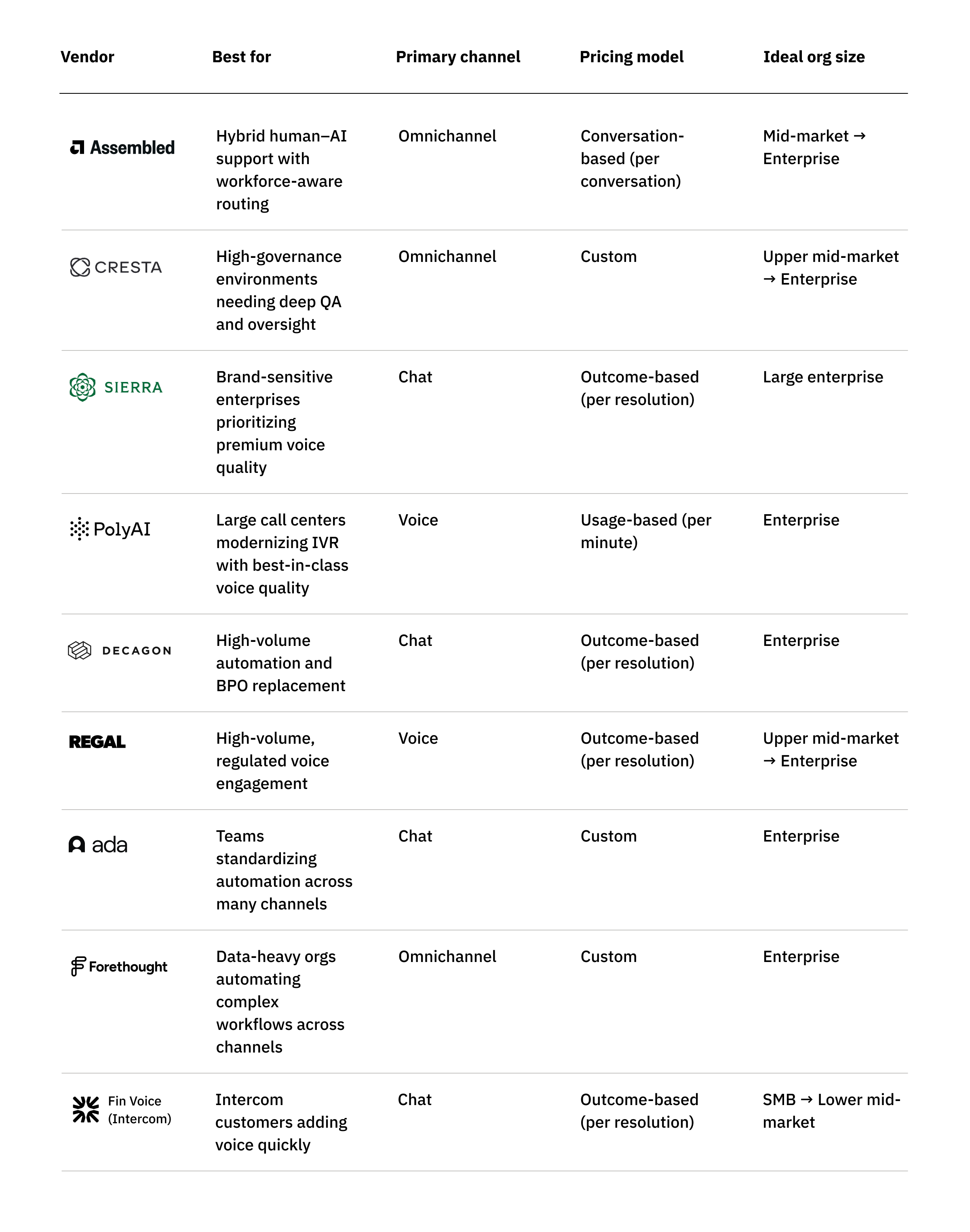
What follows is a practical, experience-driven breakdown of the strongest AI voice agents available in 2026 — starting with platforms designed to work with your support operation, not around it.
Assembled

Assembled is the only AI voice agent built on top of a modern workforce management platform, giving it a fundamentally different orientation from typical voice AI vendors. Instead of pitching full automation from day one, Assembled treats AI agents as part of the workforce — planned, measured, and optimized alongside human agents. Rather than being voice-first or chat-first, Assembled is omnichannel by design — with voice, chat, email, and agent copilots all planned and optimized together. For support teams that want to scale automation responsibly without sacrificing the customer experience, this hybrid approach is a major differentiator.
Assembled’s voice agent ties into the platform’s existing scheduling, forecasting, and analytics systems, allowing organizations to gradually increase autonomy with guardrails. You can even adjust AI handoff sensitivity to account for your team’s real-time capacity. A single workflow can be deployed across voice, chat, email, and even agent copilots, giving teams an efficient way to manage automation across all channels. Paired with conversation-based pricing, designed to stay predictable even as conversations get longer or seasonal volume spikes, and context-aware handoffs, Assembled is especially strong for companies that prioritize experience quality and long-term operational maturity over deflection metrics.
Key features:
- AI voice agent built on a workforce management and operations foundation
- Copilot → autonomous pathway for safe, gradual automation
- Unified agentic workflows deployed across voice, chat, email, and agent assist — built and managed with a no-code workflow builder
- Conversation-based pricing that avoids per-minute overages
- Intelligent handoffs based on sentiment, urgency and complexity
- Unified analytics showing AI and human performance side-by-side
- Deep integrations with major CRMs, CCaaS platforms, and support tools
Pricing: Flexible pricing options: $0.99 per conversation (fixed) or $0.40 per conversation plus $2.00 per fully automated resolution (usage-based) with no per-minute or per-agent fees in either structure. Enterprise plans available; contact sales for specifics.
Pros:
- Best-in-class for hybrid human–AI collaboration and orchestration
- Single workflow logic across channels reduces operational overhead and lost context between channels
- Context-aware handoff logic preserves customer experience quality
- Transparent, predictable pricing for longer or complex conversations
- Fast speed-to-value with no-code setup and plug-and-play integrations.
Cons:
- Prioritizes orchestration and workforce-aware routing over telephony primitives, so a few advanced carrier-level features may rely on partner tools.
- Advanced reporting is powerful but may require onboarding time to fully understand all dimensions of human + AI analytics.
- Real-time capacity-aware routing is unique, but may require calibration for organizations with highly fluctuating staffing models.
G2 rating: 4.8 ⭐️(22 ratings)
Best for: Mid-market and enterprise support teams that want to scale AI responsibly — prioritizing customer experience, human-AI collaboration, and operational maturity. Ideal for organizations that want automation to work with human agents, not replace them, and for multi-channel support orgs looking for unified workflows and analytics across voice, chat, and email.
Cresta

Cresta positions itself as a premium, enterprise-grade platform built around deep human–AI collaboration, rather than standalone automation or deflection. Its roots in conversation intelligence shape how the voice product is designed: learning from real interactions, identifying what drives outcomes, and improving both AI performance and human coaching over time. Instead of treating voice AI as an isolated “voicebot,” Cresta presents voice agents, real-time agent assist, QA/coaching, and analytics as a single operating system for the contact center.
For buyers evaluating AI voice agents, Cresta stands out in the breadth of lifecycle and governance tooling it brings to deployments. The platform emphasizes a structured AI agent lifecycle — discover what to automate, build, test, deploy, and optimize — supported by large-scale simulation, evaluation, and real-time supervisory controls. This orientation makes Cresta a strong fit for complex, high-volume, and regulated contact centers, especially those that need human-in-the-loop oversight and continuous optimization. Buyers should plan, however, for a high-touch, implementation-heavy experience, and recognize that the platform may be more than required for teams seeking lightweight voice automation or fast pilots.
Key features:
- Unified platform spanning AI voice agents, real-time agent assist, and conversation intelligence
- Automation Discovery that analyzes historical conversations to identify what to automate first
- No-/low-code AI agent builder for persona, escalation rules, compliance boundaries, and sub-agents
- Automated testing and simulation to validate behavior and edge cases before go-live
- Agent Operations Center for real-time oversight, risk detection, and human intervention
- Omnichannel context retention across voice and digital interactions
- Enterprise security and compliance posture (SOC 2, ISO 27001, HIPAA, ISO 42001, etc.)
- High-touch deployment and support model with strong services and engineering partnership
Pricing: Custom, quote-based enterprise pricing. Costs vary by channels, volumes, enabled modules, and implementation scope. No public rate card.
Pros:
- Deep conversational insights that strengthen coaching and inform voice automation strategy
- Strong human–AI collaboration model combining automation, agent assist, and oversight
- Robust testing, evaluation, and optimization workflows for higher-assurance deployments
- Broad enterprise integration coverage across CCaaS, CRM, and knowledge systems
- Strong governance, security, and compliance posture for regulated environments
Cons:
- Implementation and ongoing optimization can be complex and resource-intensive
- High-touch, quote-only pricing limits accessibility for smaller teams and quick trials
- Some users report a learning curve and occasional transcription or integration edge cases
- Fewer public reviews than more mainstream CX platforms, which can make benchmarking harder
- Likely over-engineered for teams seeking simple, fast voice-only automation
G2 rating: 4.3 ⭐️(42 ratings)
Best for: Large, complex contact centers (upper mid-market to enterprise) that need both AI voice automation and real-time human support, and value conversation intelligence, governance, and a structured lifecycle for deploying and improving AI agents. Less well suited for companies prioritizing quick pilots, transparent pricing, or lightweight voice-only automation.
Sierra
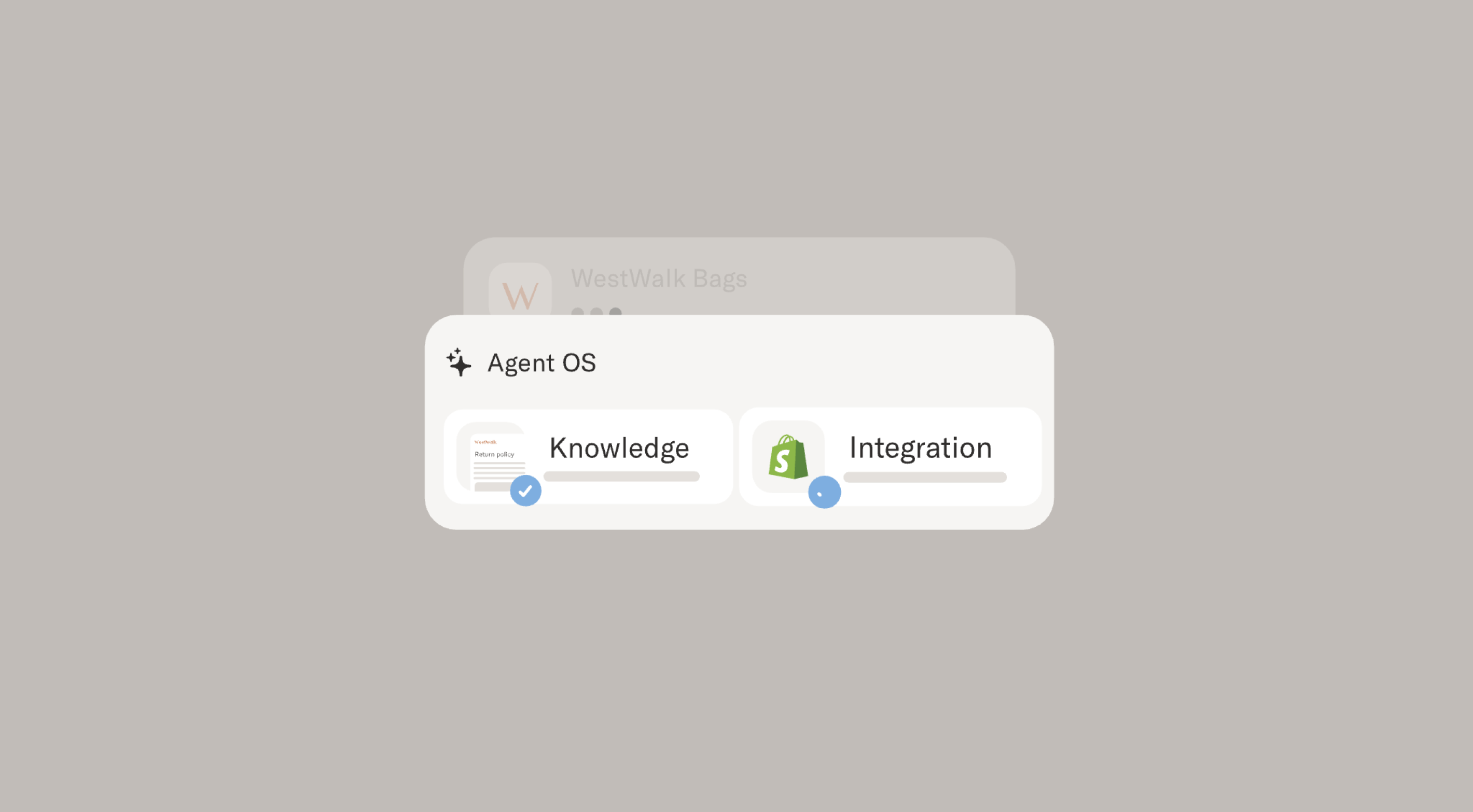
Sierra positions itself as a premium, enterprise-grade option in the AI voice agent market, with a strong focus on brand safety, trust, and emotionally intelligent customer interactions. Rather than framing voice AI as IVR modernization or lightweight call deflection, Sierra presents its voice agent as a goal-oriented system designed to resolve customer issues end-to-end while meeting enterprise security and compliance requirements. While Sierra’s platform originated with a chat-first Agent OS, its voice offering extends that same architecture to high-value phone interactions where experience quality and brand control matter most.
For buyers evaluating voice AI, Sierra stands out in two areas: (1) voice experience quality — including natural pacing, interruption-friendly turn-taking, empathetic tone, and low latency — driven by a proprietary voice interaction stack, and (2) commercial alignment through outcome-based pricing, where customers pay when the voice agent successfully resolves a case or achieves a defined outcome. Teams considering Sierra should plan for a high-touch deployment model and carefully scope use cases up front, as long or highly complex conversations may require additional tuning. Sierra’s voice product is designed primarily for autonomous resolution, with less emphasis on real-time copilot or agent-assist workflows during live calls.
Key features:
- Outcome-based pricing (pay only for successfully resolved voice cases or defined outcomes)
- Goal-oriented voice agents built on Sierra’s Agent OS architecture
- Enterprise guardrails, security, and brand protection for voice interactions
- Lifelike, interruption-friendly voice tuned for natural conversational flow
- Strong parsing of spoken structured inputs (emails, order numbers, acronyms)
- Deep call center, telephony, and compliance-oriented integrations
- Voice testing and simulation tooling designed for real-world call conditions
- High-touch, co-development implementation model for complex voice deployments
Pricing: Outcome-based, quote-based enterprise pricing. No public rate card; costs vary by call volume, workflow complexity, and the outcomes being measured.
Pros:
- High-quality voice conversations that sound natural, empathetic, and interruption-friendly
- Strong brand safety and compliance posture for regulated or risk-sensitive voice environments
- Performs well with messy spoken inputs (IDs, addresses, acronyms, long strings)
- Fits into existing call center infrastructure without requiring a full stack replacement
- Robust voice-specific testing and simulation capabilities to validate real-world performance
- Strong leadership credibility and trust signals with enterprise buyers
Cons:
- Voice deployments typically require weeks to months and close collaboration during setup
- Long or highly complex voice conversations may require careful scoping to avoid context drift
- Less emphasis on real-time agent-assist or copilot workflows alongside live voice calls
- Outcome-based pricing can make forecasting more complex during spikes or seasonal volume
- Custom pricing and high-touch delivery reduce suitability for fast, self-serve rollouts
G2 rating: 4.3 ⭐(13 ratings)
Best for: Brand-sensitive, high-volume enterprises — especially in regulated industries — that want premium AI voice automation with strong brand controls and are comfortable with high-touch implementation and outcome-based pricing. Less well suited for teams prioritizing rapid self-serve deployment, highly predictable per-call economics, or voice strategies centered on continuous human–AI co-handling of live calls.
PolyAI

PolyAI positions itself as a premium, enterprise-focused voice AI vendor built specifically for phone automation in high-stakes environments. Its core value proposition is making automated phone interactions feel genuinely human, even under real-world conditions like noisy telephony, interruptions, accents, and long, multi-turn conversations. PolyAI’s technology is explicitly voice-first, supported by a proprietary stack (including custom SLU and phoneme-level capabilities) and broad global language coverage.
For buyers evaluating AI voice agents, PolyAI stands out when the phone channel is mission-critical: high call volumes, regulated use cases, complex customer intent, and strict expectations around brand voice and customer experience. The platform is anchored in PolyAI’s Agent Studio, which it describes as “voice-first omnichannel” — meaning it can extend beyond voice, but product design, engineering effort, and customer outcomes are optimized for phone conversations first, not cross-channel orchestration. Buyers should expect a high-touch, guided deployment model, with strong vendor involvement in setup and optimization, and less emphasis on fully self-serve iteration.
Key features:
- Voice AI agents designed for natural, interruption-friendly phone conversations (voice-first foundation)
- Speech analytics and insights built around call audio and transcripts
- Agent assist capabilities providing real-time support for human agents
- Enterprise-grade security and compliance posture (SOC 2 Type II, ISO/IEC 27001)
- Strong global language support and multinational deployment experience
- Proven integrations with major contact-center and telephony platforms
Pricing: Quote-based, per-minute usage pricing for ongoing voice interactions. PolyAI states that per-minute pricing includes maintenance, proactive performance improvements, and 24/7 support. No standard per-minute rate is published.
Pros:
- Best-in-class perceived voice quality, often described as warm, human-like, and natural
- Strong containment and robustness in complex, multi-turn phone interactions
- Enterprise-ready trust signals, including security certifications and white-glove support
- Clear fit for global, multilingual phone operations with high CX expectations
Cons:
- Limited self-serve control for rapid iteration; some changes and testing require PolyAI involvement
- UI can feel laggy at times, particularly in complex configurations
- Pricing structure is transparent (per-minute) but not numerically disclosed, making benchmarking harder
- Teams pursuing a primarily omnichannel or chat-led strategy may find PolyAI heavier than needed
G2 rating: 5 ⭐(12 ratings)
Best for: Large enterprises with heavy phone volumes and high CX expectations — particularly in regulated industries, complex call environments, and multilingual operations — that want a premium, voice-first solution and are comfortable trading some self-serve agility for guided deployment, strong outcomes, and ongoing optimization.
Decagon
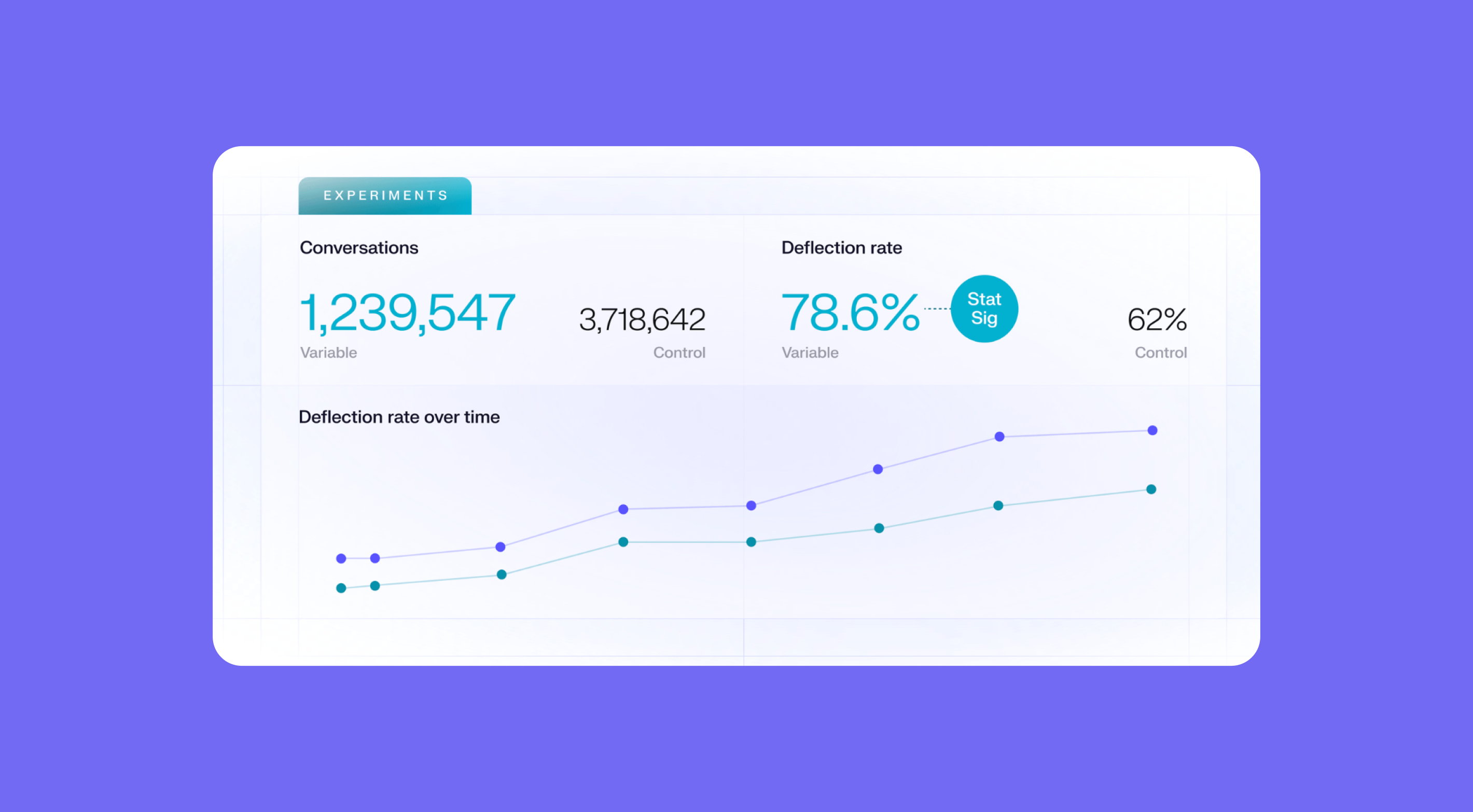
Decagon is an enterprise-grade AI agent platform built around concierge-style automation across customer support channels, using a shared agent architecture to power chat, email, SMS, and voice through a single agent “brain” with cross-channel memory. Its core pitch isn’t IVR modernization — it’s end-to-end workflow automation designed to resolve customer issues, reduce support headcount, and replace large portions of outsourced or in-house teams. In practice, many teams adopt Decagon first for digital automation and then extend those same workflows to voice, prioritizing consistency of behavior and outcomes over channel-specific voice optimization.
Where Decagon shines is automation depth. The platform is designed to handle complex, policy-heavy workflows — not just FAQs — using its Agent Operating Procedures (AOPs) framework. For high-volume environments with well-defined processes, this can unlock meaningful deflection and cost reduction. That depth comes with trade-offs. Despite positioning AOPs as natural-language or no-/low-code, successful deployments often rely heavily on Decagon’s Forward Deployed Engineers and embedded Agent Product Managers to design, test, and evolve workflows. As Decagon has moved further upmarket, some SMB and lower mid-market teams report slower access to hands-on support and a platform that feels heavy — and difficult to operate independently — outside of large enterprise contexts.
Key features:
- AI agents spanning chat, email, SMS, and voice on a shared agent architecture
- Voice capabilities designed to support automated workflows and escalations, rather than continuous human–AI co-handling
- Agent Operating Procedures (AOPs) for automating complex, multi-step tasks
- Enterprise analytics, observability, testing, and QA tooling (Watchtower, simulations)
- Human escalation with automatic conversation summaries
- Outbound and inbound voice support with SMS extension within workflows
- Deep integrations with Zendesk, Salesforce, and modern telephony stacks
Pricing: Quote-only, enterprise pricing. Decagon describes per-conversation and per-resolution pricing models publicly, but does not publish baseline rates. Pricing varies by volume, automation scope, and deployment complexity.
Pros:
- Strong automation depth for complex, repeatable workflows
- High reported deflection and resolution rates (often ~70–80% in production)
- Unified agent logic across channels reduces duplication between chat and voice
- Advanced analytics and QA tooling valued by enterprise teams
- High-touch implementation partnership for large deployments
- Natural-sounding voice quality supported by ElevenLabs
Cons:
- Ongoing reliance on Decagon’s engineers for changes and optimization limits self-serve agility
- Platform complexity and data requirements can be overwhelming for smaller or less mature teams
- Premium, opaque pricing makes early-stage budgeting difficult
- No native workforce management or capacity-aware hybrid human–AI orchestration layer, which can make planning, staffing, and escalation harder as voice volume grows
G2 rating: 4.9 ⭐️(18 ratings)
Best for: Large, cost-focused enterprises with high volumes and well-defined workflows that are explicitly aiming to automate and replace significant portions of human support — particularly chat-heavy or BPO-driven operations. Less suited for teams prioritizing voice-led CX, hybrid human–AI collaboration, capacity-aware routing, or lightweight, self-serve automation.
Regal
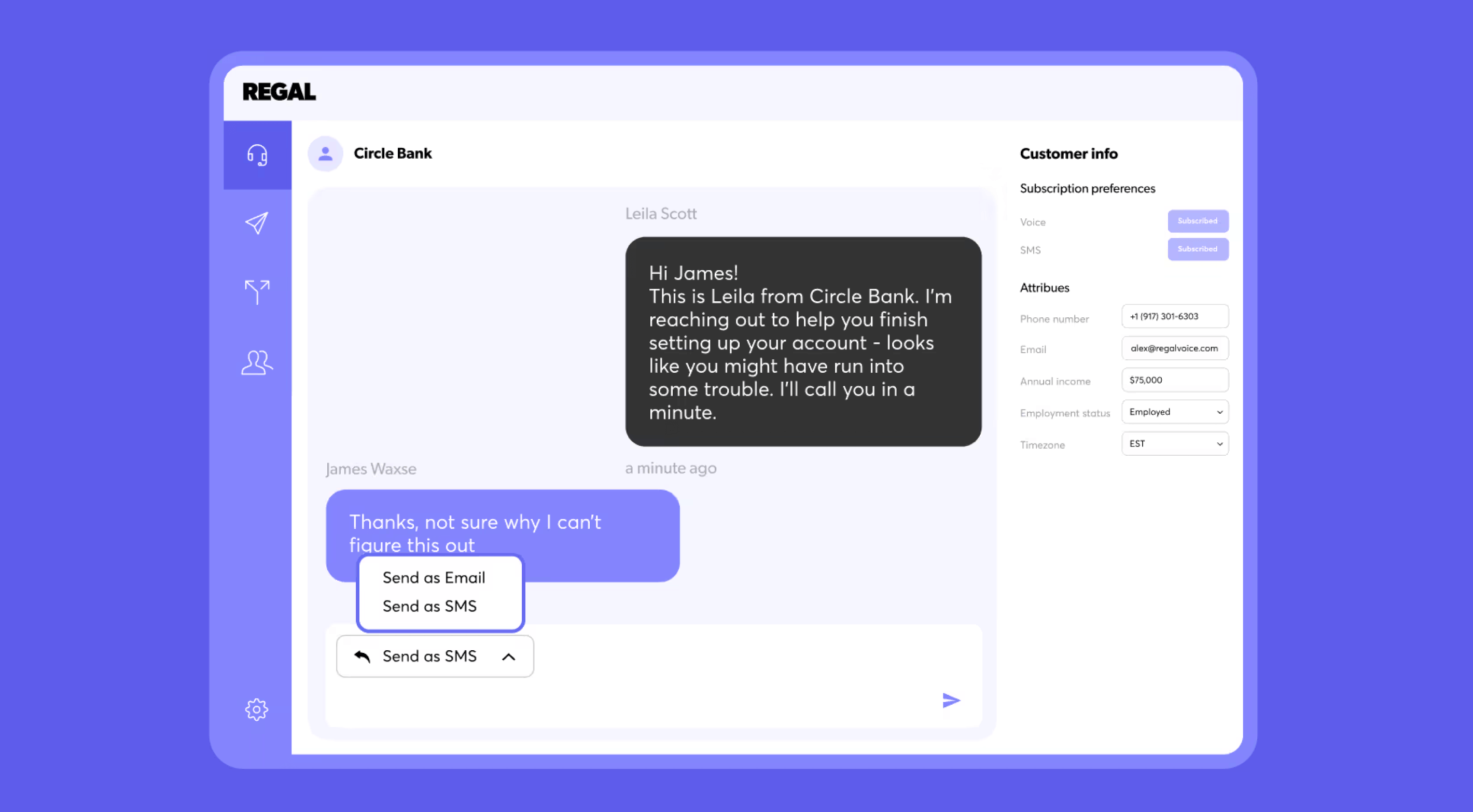
Regal positions itself as an AI-first customer engagement platform, with voice agents as a core capability rather than a bolt-on. It combines AI phone agents with SMS/chat agents, outbound journey orchestration, and a unified agent desktop to support high-volume, high-consideration customer interactions. Voice is the primary channel, but it’s designed to work alongside messaging and lifecycle engagement within a single system.
Regal is strongest in regulated, revenue-critical environments where compliant outbound calling, personalization, and answer rates matter. The trade-off is scope: Regal owns dialing, journeys, and engagement execution end to end, which can introduce more platform surface area than teams looking to add AI agents on top of an existing workforce-aware support operations stack may need. Analytics UX and some integrations are also less mature than the core calling and journey orchestration experience.
Key features:
- Human-sounding AI phone agents for inbound and outbound calls
- Unified AI agents across voice, SMS, and chat (“build once, deploy anywhere”)
- No-code AI Agent Builder for call flows, behaviors, and escalation logic
- Event-driven Journey Builder for personalized, multi-step outbound and cross-channel engagement
- Branded caller ID, spam remediation, and compliance tooling (TCPA/TSR, quiet hours, opt-outs)
- Unified customer profiles for real-time personalization
- Agent desktop for human–AI collaboration in high-consideration workflows
- 40+ integrations plus webhooks and event streaming
Pricing: Custom, quote-only enterprise pricing. Regal does not publish per-minute, per-call, or per-seat rates; pricing is negotiated based on volume, channels, use cases, and implementation scope.
Pros:
- Strong voice experience with proven scale in high-volume environments
- Best-in-class branded calling and spam remediation that materially improves answer rates
- Powerful journey orchestration for outbound and event-driven engagement
- No-code tools that operations teams can own without heavy engineering dependency
- Excellent customer support and white-glove guidance, consistently praised in reviews
- Deep compliance posture for regulated industries
Cons:
- Analytics and reporting UX are less mature than journey orchestration and dialing features
- Some integrations require additional setup or engineering effort
- Quote-only pricing makes early cost benchmarking difficult
- Platform breadth may be more than needed for teams focused purely on support automation
- Does not provide native workforce management or capacity-aware orchestration across humans and AI
G2 rating: 4.7 ⭐ (44 ratings)
Best for: Enterprise and upper mid-market organizations running high-volume, high-consideration voice programs — especially in regulated industries — that want to own customer engagement end to end (dialing, journeys, and compliant outreach). Less ideal for teams seeking transparent pricing, lightweight voice pilots, or AI agents that plug directly into an existing workforce-aware support operations layer.
Ada
Ada’s AI voice agent is part of a broader enterprise automation platform, where a single AI “employee” operates across chat, email, SMS, social, and voice through Ada’s proprietary Reasoning Engine™. Automation logic, governance, and learning are shared across channels within a centralized CX layer. For large, high-volume organizations willing to standardize automation across their support stack, Ada can deliver strong results — with voice typically deployed as an extension of existing omnichannel workflows rather than planned as a distinct operational surface.
Ada’s strength lies in operational tooling and scale. Playbooks support SOP-style automation, coaching tools allow teams to iteratively refine responses, and broad multilingual and CCaaS integration coverage makes Ada viable for global enterprises. The primary risk isn’t theoretical capability — it’s experience quality in production. While well-designed deployments can achieve high automation rates, public feedback shows that poorly governed implementations often result in looping behaviors and difficult escalation paths. On voice, those failures are more visible and more costly, since customers have little tolerance for dead ends or blocked access to human help.
Key features:
- AI voice agent powered by Ada’s Reasoning Engine™ (understand → isolate → retrieve → create → resolve)
- Voice delivered as part of a unified omnichannel automation platform (chat, email, SMS, social)
- Playbooks for automating SOPs and repeatable workflows across channels
- Granular coaching and tuning tools to improve responses over time
- Telephony via Twilio (Ada-managed or bring-your-own), plus SIP and CCaaS integrations
- Broad CRM, helpdesk, and contact center integrations across enterprise stacks
- Strong trust, security, and governance posture for regulated environments
Pricing: Custom, enterprise quote-only pricing. Often resolution- or usage-based, with no published voice rate card. Contracts typically skew toward high-volume enterprise deployments.
Pros:
- Proven automation outcomes when well-designed and tightly governed
- Deep omnichannel automation beyond voice alone
- Mature playbook model for repeatable, high-volume interactions
- Admin-friendly no-code tooling for basic workflows
- Broad language support and extensive CCaaS / CRM integrations
- Strong security and compliance credentials (SOC 2, HIPAA, GDPR, AIUC-1)
Cons:
- Voice experience quality is highly dependent on configuration and escalation design
- Public end-user sentiment highlights frustration with loops and blocked human access
- “Walled garden” approach may require consolidating or replacing parts of the CX stack
- Pricing opacity makes cost benchmarking difficult
- Advanced use cases often require expert services and ongoing governance
- No native workforce management or capacity-aware hybrid human–AI planning layer
G2 rating: 4.6 ⭐(167 ratings)
Best for: Large enterprises with very high conversation volumes that are prepared to centralize automation on a single platform and invest heavily in conversation design, monitoring, and governance. Best suited for organizations prioritizing omnichannel scale over voice-led CX, and less ideal for teams seeking transparent pricing, plug-and-play voice automation, or tightly coordinated human–AI operations with integrated capacity planning.
Forethought

Forethought offers an AI voice agent, but its real strength — and complexity — comes from being a broader enterprise AI orchestration platform rather than a voice-first solution. Voice runs on the same multi-agent architecture (Discover, Solve, Triage, Assist) and Autoflows engine that powers chat, email, web, and other channels. This design enables capabilities many voice-only vendors lack, such as using historical ticket data to generate workflows, surface knowledge gaps, and continuously refine automation strategy across the entire support lifecycle.
The upside is a more strategic, end-to-end approach to automation for large support organizations with complex data, fragmented knowledge, and multiple channels. The trade-off is operational overhead. Deployments tend to be data-heavy and tuning-intensive, with longer timelines and higher total cost than teams seeking fast, tactical voice automation. And like other platform-centric vendors, Forethought’s voice experience depends heavily on how escalation is designed — poorly configured handoffs can lead to loops or blocked access to human agents, which are especially damaging in phone support.
Key features:
- AI voice agent built on a multi-agent ecosystem (Discover, Solve, Triage, Assist)
- Autoflows for dynamic, reasoning-based workflows and action-taking automation
- Knowledge and content gap detection to surface missing or weak articles
- Workflow generation informed by historical case and conversation data
- Omnichannel automation across voice, chat, email, web, and more
- Enterprise-grade routing, analytics, and optimization tooling
- Integrations with major CRMs and support platforms (Zendesk, Salesforce, Intercom)
- Agent assist layer available as part of the broader platform (copilot-style support)
Pricing: Custom enterprise pricing (quote-only). No public voice usage rates. Contract size typically scales with channels automated, committed usage, and implementation scope.
Pros:
- Strong automation outcomes in large, well-resourced deployments
- Strategic capabilities beyond basic voice automation (data-driven insights + workflow generation)
- Well suited for organizations with deep or complex knowledge bases
- Unified, multi-channel platform for end-to-end automation
- Broad and reliable enterprise integrations
Cons:
- Implementations can take months and require ongoing tuning
- Pricing targets enterprise budgets and is difficult to benchmark upfront
- Higher risk of over-deflection or poor CX if escalation paths aren’t carefully designed
- Not optimized for quick pilots or lightweight voice activation
- Mixed end-user sentiment in public reviews around looping and difficulty reaching humans
G2 rating: 4.3 ⭐(163 ratings)
Best for: Large enterprises with complex support operations that want AI-driven transformation across channels — and have the operational maturity to invest in data preparation, tuning, governance, and escalation design. Less suitable for teams seeking plug-and-play voice automation, short pilots, or transparent pricing.
Fin Voice by Intercom
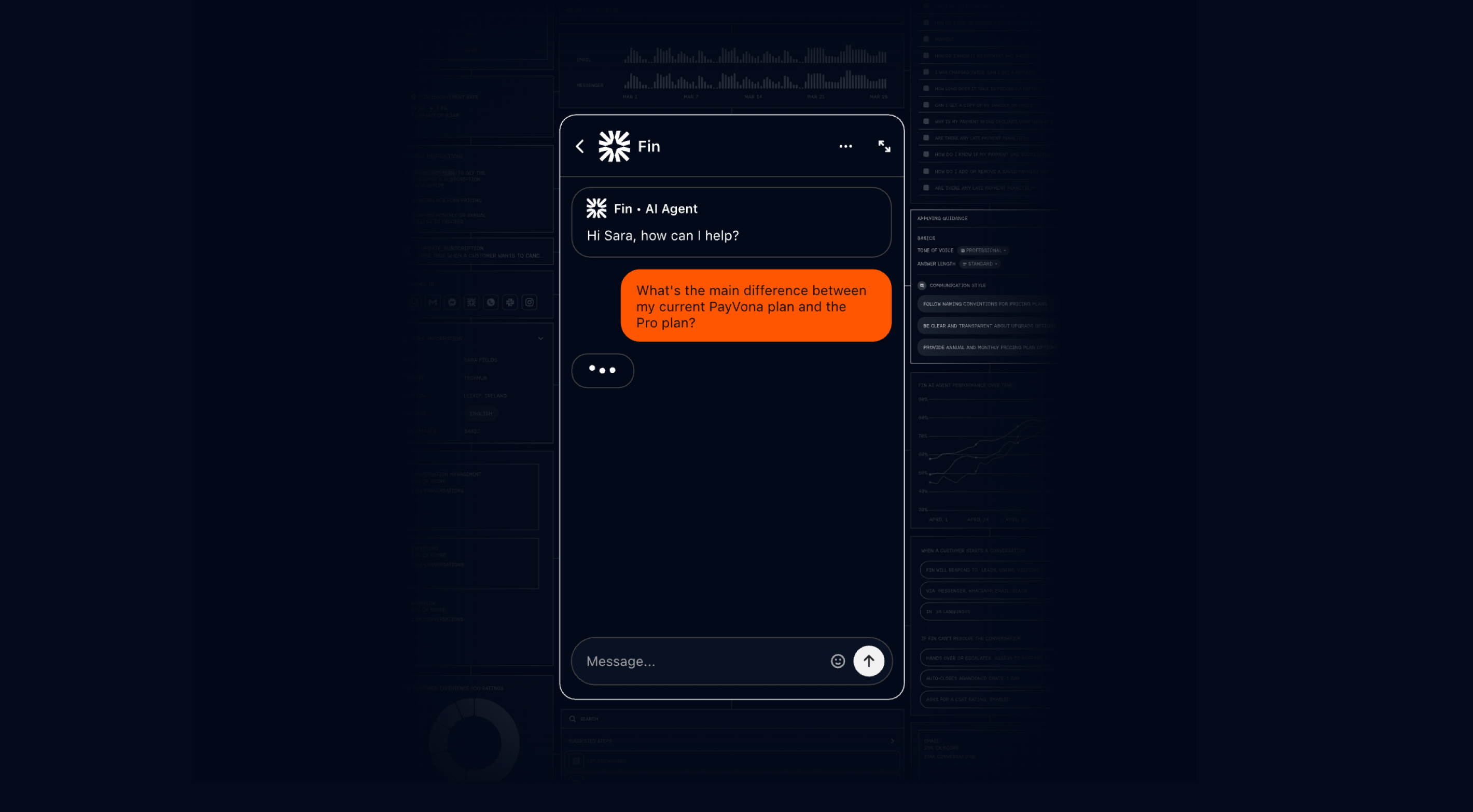
Intercom is best known as a customer service platform, and Fin Voice is positioned as an extension of its broader Fin AI Agent rather than a standalone, voice-first product. Instead of building a dedicated voice system from the ground up, Intercom brings the same AI agent used across chat and email into the phone channel. The result is an omnichannel experience that prioritizes speed to value, consistency, and ease of deployment over deep voice-specific specialization or operational control.
On paper, Fin Voice is marketed as enterprise-ready, backed by Intercom’s infrastructure, security posture, and large installed base. In practice, Fin Voice appears best suited to SMB and lower mid-market support teams with relatively standardized workflows and clearly scoped use cases. Conversational quality is strong — with low latency and phone-optimized responses that feel natural in live calls — but teams with highly complex enterprise environments, bespoke processes, or nuanced escalation logic may find Fin Voice less flexible than expected. Because voice inherits the same agent logic as chat and email, it excels at consistency, but offers fewer levers for channel-specific orchestration or workforce-aware routing.
Key features:
- AI voice agent powered by the same Fin engine used across chat and email
- Ultra-low-latency responses designed for natural, interruption-friendly calls
- Phone-specific response tuning with short, paced answers (not repurposed chat outputs)
- No-code configuration for knowledge, policies, and Procedures
- Pre-deployment simulation, previews, and regression testing tools
- Seamless handoffs to human agents with transcripts and summaries
- Omnichannel consistency across voice, chat, and email within Intercom’s platform
- Built-in helpdesk, inbox, and automation tooling
Pricing: Fin AI Agent is priced at $0.99 per successful AI resolution across channels, with Intercom platform plans starting at $29 per seat per month. Fin Voice itself is offered via custom, sales-led pricing, with no public per-minute or per-call rates published. Telephony usage is typically billed separately through Intercom’s platform.
Pros:
- Fast time to value, especially for existing Intercom customers
- Strong conversational quality with natural pacing and low latency on calls
- No-code setup that CX and ops teams can manage without engineering support
- Robust simulation and testing tools to validate behavior before launch
- Unified AI behavior across chat, email, and voice
Cons:
- Voice capabilities are newer and less mature than chat and email
- Limited flexibility for highly bespoke or deeply customized enterprise workflows
- Brand-voice fine-tuning can be constrained for teams with strict guidelines
- Pricing and packaging skew toward bundled Intercom platform adoption
- Less suited for large, highly customized enterprise contact centers with complex routing or staffing models
G2 rating: 4.5 ⭐(3,658 ratings)
Best for: SMB and lower mid-market support teams — particularly those already using Intercom — that want to add voice automation quickly using the same AI agent across chat, email, and phone. Best suited for standardized use cases and fast deployment, and less ideal for organizations that need deep voice-specific control, workforce-aware routing, or highly customized enterprise call flows.
How to choose the ideal AI voice solution for your business
Choosing an AI voice agent isn’t just a technology decision — it’s a strategic investment that will shape your support operations for years. After working with hundreds of teams adopting voice AI, a clear pattern emerges: the most successful implementations start with aligned goals, rigorous evaluation, and a plan for long-term scalability. Here’s a practical framework to guide your decision.
Prioritize business goals and needs
Start with outcomes, not features. Before evaluating vendors, clarify what success looks like for your organization. This ensures your pilot, KPIs, and vendor selection remain aligned.
Ask yourself:
- What problem are we solving?
(Cost reduction? Lower wait times? CSAT improvement? After-hours coverage?) - What does success look like in 90 days, 6 months, 12 months?
- Which KPIs will prove ROI to your leadership team?
Most teams cluster around a few core goals:
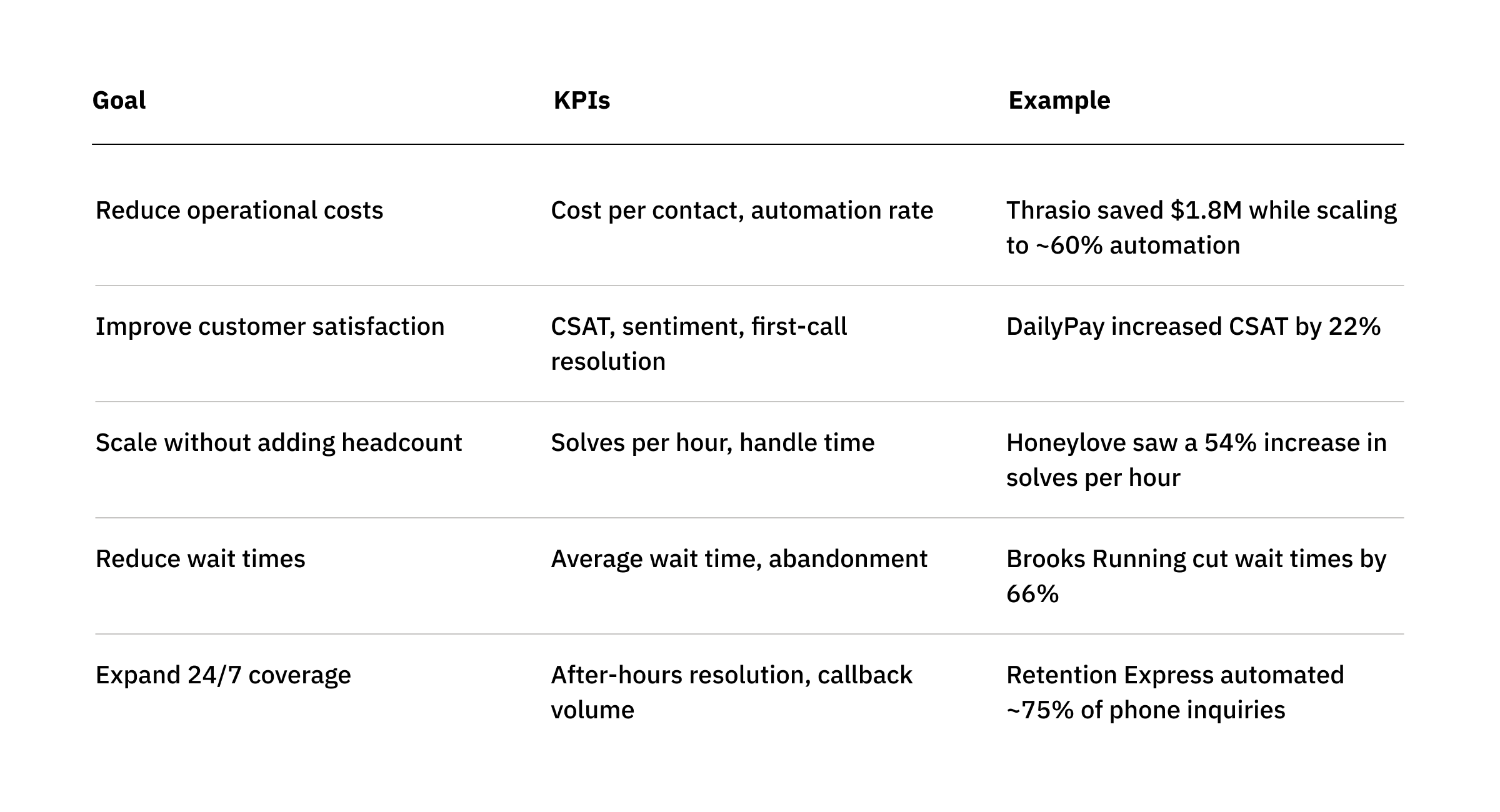
The key is matching your pilot and vendor evaluation to the specific outcomes you want. For example:
- If you want higher resolution, look for platforms with strong CRM, billing, and backend integrations.
- If you want better routing, prioritize advanced NLU, sentiment detection, and pre-handoff verification.
- If you want better after-hours coverage, look for consistent performance, smart follow-up workflows, and contextual escalations.
Teams that define narrow, measurable pilot goals — like “resolve 25% of cancellation requests” — see time to value significantly faster.
Ensure interoperability with current systems
Weak integrations — not weak AI — cause most failed voice implementations. Early in your evaluation, test how well a platform fits into your existing infrastructure across four layers:
1. Telephony and contact center platform
Your AI must slot naturally into tools like Five9, Talkdesk, Zendesk Talk, Genesys, or Zoom Contact Center.
If SIP connections are required, plan for 4–6 weeks of setup, testing, and validation.
2. CRM and ticketing systems
Look for real-time, two-way sync for:
- accurate case creation
- full customer history
- automated wrap-up notes
- consistent categorization
Poor CRM integration creates downstream reporting and QA issues — and undermines trust in automation.
3. Knowledge bases
Your AI should be able to pull from and stay aligned with:
- Notion
- Confluence
- Guru
- Google Drive
…and it must respect permissions and version control cleanly.
4. Backend systems
This is where meaningful automation happens. Ensure the AI can interact with:
- order and fulfillment tools (Shopify, ERP systems)
- authentication APIs
- billing/payment systems
- custom internal applications
A unified performance view — like Assembled’s — ties AI activity, human activity, and WFM data together so teams can understand operational impact without juggling dashboards.
Watch out for vendors who:
- require manual data exports
- can’t adapt to future CRM changes
- split reporting across multiple interfaces
- don’t support real-time syncing
Ask every vendor: “Show me how your AI accesses our CRM data during a live call.”
The strongest partners will have a crisp, confident answer.
Pilot programs for testing performance
Never buy an AI voice solution without proving its value in your environment — with your data, your edge cases, and your workflows.
There are three common pilot structures:
1. Opt-out trials (30–90 days)
Good when you’re already strongly leaning toward a vendor.
2. Paid pilots
Best for validating a specific workflow before expanding.
3. Proof-of-concept (2–12 weeks)
Tight, time-bound tests focused on validating critical capabilities.
Best practices for voice AI pilots:
- Scope narrowly.
Good: “Resolve 25% of cancellation requests.”
Bad: “Resolve 25% of all cases.” - Use preview tools first before exposing customers.
- Start with small volumes (20–100 calls) and scale only after quality is validated.
- Plan integration timelines for SIP, authentication APIs, and backend connections.
- Define success criteria up front — technical, operational, and value-based.
A successful pilot proves five things:
- The AI works with your systems.
- Responses are accurate and on-brand.
- Agents can manage and refine workflows without engineering.
- Core metrics move in the right direction.
- The vendor is responsive, transparent, and collaborative.
Plan for evolving demands
Your needs today won’t match your needs in 12–36 months. A future-proof AI voice solution should be able to grow with your business across five dimensions.
1. Multi-channel expansion
Workflows built for chat, email, or voice should be reusable with minimal changes. This protects your investment as your channel mix shifts.
2. Geographic and market expansion
If you’re expanding into new regions or launching new brands, your AI should support:
- multiple languages
- time zone–aware handoffs
- regional compliance
- multi-brand routing and reporting
3. Automation maturity
Support operations typically evolve from:
- 5–10% automation (simple FAQs)
- to ~30% (AI-assisted workflows)
- to 40–50%+ (full autonomous resolution)
Choose a platform that supports this climb without requiring full rebuilds at each stage.
4. Workforce management integration
As automation grows, staffing strategy must evolve. Integrating voice AI with WFM data ensures:
- accurate forecasting
- SLA protection
- capacity-aware handoffs
- right-sized staffing plans
5. Flexibility across brands, segments, and products
If you operate multiple brands or business units — or if you’re a BPO — look for:
- per-brand workflow controls
- granular routing rules
- detailed segment-level reporting
Ask vendors directly:
- “What happens when we triple our automation?”
- “If we switch CRMs, how painful is migration?”
- “Can we take our workflows and data with us if we change platforms?”
A scalable platform gives clear, confident answers — not vague reassurance or lock-in.
Add Assembled to your evaluation
Assembled is designed for support teams that want to scale voice automation while maintaining a high-quality customer experience. Rather than treating AI voice agents as a standalone layer, Assembled brings automation into a broader support orchestration platform, with shared workflows across voice, chat, email, and agent assist.
This approach makes it easier to introduce automation gradually, refine behavior with no-code tools, and ensure handoffs, routing, and reporting stay aligned with how the support operation actually runs.
Book a demo to see how Assembled’s AI voice agent supports hybrid human–AI support with shared workflows, context-aware handoffs, and predictable pricing.
{{banner}}