Today’s customers want helpful answers — and they want them right now. It’s a lofty expectation that’s inspired many customer service teams to turn to automation and AI-powered technology to improve their response times, handle high volumes of customer inquiries, and deliver personalized experiences.
But here’s the tension: Even if artificial intelligence (AI) speeds things up, most customers don’t want to feel like they’re being helped by bots.
Customers are still wary of AI in customer support. A Gartner survey revealed that a whopping 64% of customers would prefer that companies didn’t use AI for customer service.
Fortunately, there’s a way you can reap the efficiency-boosting benefits of AI without sacrificing your customer experience. It’s called conversational AI.
In this guide, we’ll cover what conversational AI is, how it works across channels, the benefits for your team and your customers, and the practical steps to implement, measure, and scale it with confidence.
What is conversational AI?
Conversational AI is an AI technology that enables machines to answer customer questions and engage in interactions using natural, human-like language. Unlike traditional chatbots with rigid scripts, conversational AI understands context, interprets intent, and responds the way a trained support agent would.
The difference is immediate. When a customer asks about your return policy, conversational AI processes the question, understands what they actually need, and responds in natural language — not the stiff, robotic responses you’re used to from legacy chatbots.
This technology uses natural language processing (NLP) and machine learning to facilitate real-time customer conversations through chatbots and virtual assistants. It moves certain common questions or interactions off your support agents’ plates and streamlines your service operations — while simultaneously delivering relevant information and speedy responses that increase customer satisfaction.
How does conversational AI work?
Conversational AI works by combining multiple technologies to understand and respond to customer inquiries in real time. At its core, the system analyzes language, interprets meaning, and generates appropriate responses — all in seconds.
The process follows four key steps:
- Natural language understanding (NLU): The system processes what the customer says or types, breaking down the query into intent and entities.
- Context analysis: The AI considers previous interactions, customer data, and conversation history to understand the full picture.
- Response generation: Using machine learning models trained on billions of support interactions, the system crafts a response that matches your brand voice and directly addresses the customer’s need.
- Action execution: For resolution-first platforms like Assembled, the AI doesn’t just provide information — it takes action in your systems.
The entire cycle happens in real time, giving customers instant, accurate help without the frustration of navigating phone trees or waiting for an available agent.
Four types of conversational AI to know
There’s a long list of advancements in AI tools in the past few years — and conversational AI is one of the more relevant and impressive ones when you want to optimize your service experience and operations.
However, conversational AI itself is a broad category and there are several different types of this technology under this umbrella:
1. Chatbots
You’re already familiar with chatbots. These automated programs are used on websites or messaging platforms to handle customer queries and provide instant responses with little to no interaction from your human agents. The chatbot typically relies on predefined scripts and rules to deliver programmed responses.
Example: A customer asks your website chatbot about product availability and the chatbot responds with information that satisfies the customer’s needs.
2. Generative AI bots
A generative AI bot is similar to a chatbot as it engages in customer conversations via messaging. But, think of it as the next step up from a typical chatbot.
Example: A customer asks a generative AI bot for help troubleshooting a technical issue. The bot asks clarifying questions before providing tailored solutions.
3. Interactive voice responses (IVRs)
IVRs use pre-recorded messages and voice prompts to guide customers through a series of options or menus by either speaking specific words or pressing a key on their phone.
Example: A customer calls your company and is given an automated menu of options routing them to the correct live agent to help them.
4. Voice assistants
Like IVRs, voice assistants handle customer requests over the phone. However, these systems are more advanced AI-driven systems that use speech recognition technology to allow the voice assistant to interact with the customer through different voice commands.
Example: A customer calls to update their billing information and the voice assistant confirms their address, asks if the customer wants to update their payment method, and provides information about upcoming billing cycles.
What are the benefits of conversational AI for customer service?
According to recent research, 52% of contact centers have already invested in conversational AI — and another 44% plan to adopt it.
That explains why so many support teams are throwing their weight behind conversational AI solutions. Because of the many compelling benefits for agents and customers.
Benefits for your support team:
- Smoother workflows: Conversational AI handles FAQs and common requests, freeing agents for complex conversations that require human judgment.
- Scalability: Expand your service offerings and support channels without aggressive hiring, reducing cost-per-contact while maintaining quality. Research shows generative AI can increase issue resolution by 14% per hour while reducing time spent per issue.
- 24×7 availability: Meet the 60% of customers who expect always-on service without burning out your team.
- Consistent quality: Deliver uniform responses across every interaction, eliminating the variability that comes with human-only support.
Benefits for your customers:
- Multilingual support: Serve customers in their native language without hiring fluent speakers for every language you support.
- Shorter wait times: Provide almost instant responses that human agents simply cannot match, even on their best day.
- Self-service options: Give customers the 81% of users want — the ability to get answers without connecting to a live agent.
- Accessibility: Reach customers on their preferred channels, whether that’s chat, voice, messaging apps, or email.
How to establish best practices with conversational AI in customer service
It’s tempting to think of customer support AI as a “set it and forget it” solution — something you put in place once and then sit back and watch as tasks are magically done for you. In reality, you need to be more hands-on and proactive to effectively use contact center automation and AI. Here’s how.
Understand the ins and outs of your customers
You can’t expect your conversational AI solution to know your customers if you don’t know them. Training your AI starts with a thorough understanding of your customers — their common needs, preferred language, and typical pain points.
Build your training foundation: Look back at previous customer interactions, conduct surveys, and collect feedback to uncover patterns. Use this information to build prompts and use cases for your AI platform.
Feed context continuously: The more information you provide — previous conversations, product details, and policy updates — the better equipped your AI becomes. It updates its algorithms based on real data, delivering accurate responses that help rather than frustrate.
This isn’t a one-time setup. Your customers evolve, and your AI needs to evolve with them.
Prioritize the customer experience
63% of customers say they’re frustrated with self-service options that use AI. That’s not evidence to skip AI altogether — it’s evidence you need to be thoughtful about how it fits into your customer journey.
Design for simplicity: Skip complex menus and jargon. Opt for straightforward journeys that let customers express their needs naturally.
Test with real scenarios: Use actual customer conversations to validate that your AI resolves issues, not just routes them.
Measure what matters: Track CSAT alongside containment rates. If customers are frustrated, your AI isn’t working — no matter how efficient it looks on paper.
Conversational AI should make your customers’ lives easier, not just your agents’ lives. If it’s not delivering that value, you need to make changes.
Know (and stick to) privacy and security regulations
Training your conversational AI platform will likely involve feeding it customer data. It’s your responsibility to confirm your chosen platform adheres to privacy regulations and protects that sensitive information. Take smart, security-minded steps like:
- Implementing encryption for particularly sensitive information
- Being transparent with customers about how their data is used
- Training your agents on what information they can feed to AI — and what should be more carefully protected
These steps foster more trust with your customers, encourage critical thinking among your support agents, and help you run a service operation that’s always above board.
Define a seamless escalation process

Conversational AI can accomplish a surprising amount, but there will inevitably still be times when a human agent needs to step in. When that happens, it’s helpful to have a defined escalation process in place that ensures a smooth transition from chatbot to human agent.
This process should answer questions like:
- What are the indicators an interaction should be passed to a human agent?
- How and where can the human agent get the context of that conversation so the customer doesn’t need to repeat themselves?
- Which agents will receive those escalations? Do you have more specific routing criteria?
- What will be communicated to the customer about that transition?
Ironing out these answers early can minimize frustration and maintain continuity in support.
Commit to continuous improvement
Your agents are constantly learning and your conversational AI platform is too — provided you’re willing to consistently teach it. You can continuously improve your conversational AI solution by:
- Regularly updating training data with real customer interactions, new trends, FAQs, emerging technologies, and product changes to ensure responses are up-to-date and relevant
- Establishing processes for customer service reps and users to provide feedback, especially when the AI fails to satisfy a customer request or question
- Frequently evaluating the performance of your conversational AI by analyzing relevant metrics like response accuracy, resolution times, and customer satisfaction (CSAT) scores
Ultimately, conversational AI is only as good as you are. And when you’re getting better at your job, consistent training and updates allow your AI solution to get better at its job too.
Choosing a conversational AI platform for your customer service team
Want to get the most out of this technology? You need to choose the right platform. There are plenty of options (a quick search on G2 yields more than 580 potential products) and sorting through them can feel daunting. Here are five things to keep in mind when weighing your options.
1. Understand your business needs and goals
Start by defining the problem: Start by defining what your support team needs most and the specific reasons you are considering conversational AI.
Common goals include:
- Reduce response times
- Handle more inquiries without adding headcount
- Improve agent efficiency and reduce burnout
- Provide self-service options customers actually want to use
- Offer multilingual support without hiring specialized agents
Determine your primary goal and use it as a filter when evaluating platforms. A clear objective keeps you focused on tools that solve your specific challenges, not just those with the most features.
2. Prioritize natural language processing (NLP) capabilities
Strong NLP capabilities determine whether your conversational AI feels intuitive or robotic. This is what allows the system to understand questions in different phrasings, detect sentiment, and generate helpful responses.
Ask vendors these questions to evaluate their NLP depth:
Handling nuance: How does your platform manage different phrasing, abbreviations, and spelling errors?
Sentiment detection: Can the AI detect frustration or urgency and adjust responses accordingly?
Language support: What languages do you support, and are all language models equally accurate?
Customization: Can we tailor language models to our industry terminology and products?
Learning capability: How does your NLP model improve from interactions over time?
Context retention: How well does the AI track longer conversations with follow-up questions?
Pay attention to specific examples in their answers. Vague responses about “advanced NLP” aren’t enough — you need evidence the system handles real-world complexity.
3. Consider integrations and scalability
Make a list of the tools your team currently uses and loves — like your CRM, knowledge bases, and customer engagement software. Then, look for platforms that seamlessly integrate with those apps. Doing so means your AI can draw from your customer history and relevant data to deliver more accurate and contextualized responses.
Additionally, consider your future plans and potential growth. Finding a solution that can grow with your team allows you to support more channels and handle higher volumes as your customer base expands.
4. Evaluate security and privacy standards
You already know that data privacy and security are non-negotiable in customer service, so that’s something you need to keep in mind when evaluating potential platforms. Confirm that the conversational AI solution complies with relevant privacy regulations, offers data encryption, and supports role-based access control.
While you're at it, make sure the platform has transparent policies for how it handles data. That will give you confidence in the platform while also helping you build trust with your customers.
5. Look at customization and training capabilities
The best conversational AI platforms will allow you to tailor interactions based on your unique needs. So, look for a tool that lets you customize prompts, responses, and workflows.
Training capabilities are equally important. Determine how easy it is to update and refine the AI with new data and scenarios. That’s something you’ll need to do frequently, so it’s worth making sure the process won’t be a pain.
How to measure the ROI of your conversational AI investments

Return to your original goal when measuring conversational AI success. The metrics that matter most are the ones tied to the specific objectives you set during evaluation.
That said, proving ROI to leadership requires hard numbers. Here are the metrics that demonstrate conversational AI impact across different business priorities:
- Cost savings: Diverting simple questions to AI can free up your resources and reduce your staffing needs, which saves money.
- Customer satisfaction (CSAT): Compare customer satisfaction scores before and after your AI implementation to see its impact.
- Resolution rate: Track the percentage of customer inquiries resolved by AI to see how well it handles issues without any human intervention.
- First contact resolution (FCR): Measure how many inquiries are resolved in the first interaction to see how efficient your AI tool is.
- Response time: Evaluate how quickly the AI handles your customer inquiries (especially compared to a human agent).
- Escalation rate: Consider the frequency of tickets transferred from AI to human agents to understand its effectiveness in managing more complex issues.
- Agent productivity: Track productivity improvements to see if AI has boosted your agents’ efficiency.
- Customer retention: Analyze whether customers have remained loyal or increased their engagement after interacting with the AI.
While metrics matter, remember to also frequently connect with your support team to collect their feelings and anecdotal experiences about how AI has both positively and negatively impacted them.
Improve your customer experience with Assembled AI
Assembled AI can help you seamlessly handle routine questions and interactions, while also ensuring your team has the structure, insights, and bandwidth to jump into more complex customer interactions when necessary.
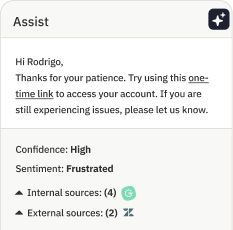
You’ll see plenty of instances of conversational AI built directly into Assembled. For example, it will guide your agents to perfect customer replies with AI Copilot. Or you can use the simple agentic workflow builder to design responsive automations across voice, chat, and email — all while using plain language to describe the steps of the workflow.
Put simply, Assembled Assist helps your support team work smarter, respond faster, and ultimately, achieve your top priority: delivering a more reliable and satisfying customer experience.
Bring more power to your customer support team. Book a demo today to see how Assembled can transform your service operations.
Frequently asked questions about conversational AI customer service
How much does conversational AI cost to implement?
The cost varies. A simple, script-based chatbot might have a low monthly fee, but a true conversational AI platform that integrates with your systems and resolves complex issues is an investment. The focus shouldn’t be on the sticker price, but on the return. When you calculate the cost per interaction for AI versus a human agent, and factor in gains from higher CSAT and agent productivity, the business case becomes clear.
Can conversational AI integrate with my existing customer service tools?
It must. A conversational AI platform that doesn’t connect to your help desk, CRM, and knowledge base is just another silo. The best solutions are built to integrate seamlessly, allowing the AI to pull customer history, understand context, and take action in your existing systems. When properly implemented, 72% of users report that AI chatbot assistance is as good as human support. This is what separates a simple question and answer bot from a resolution engine.
What happens when the AI can’t resolve a customer’s issue?
A well-designed system plans for this. A well-designed system treats this as a planned escalation, not a failure. The AI should recognize the limits of its capabilities and hand the conversation off to the right human agent. Critically, it must pass along the full context of the interaction, so the customer doesn’t have to repeat themselves. This creates a true partnership between your AI and human agents.
How long does it take to implement conversational AI?
This has changed dramatically. While older systems could take months and require significant engineering resources, modern platforms can be up and running in days or weeks. The process typically involves connecting the AI to your knowledge sources and defining a few key workflows to automate. The goal is a fast time-to-value, not a long, drawn-out project.
Will conversational AI replace my human support agents?
No, it will elevate them. While 80% of organizations expect to reduce agent headcount, nearly 80% are planning to transition agents into new positions. The goal is to elevate human agents by making their work more strategic and more human.